Text in boxes and columns
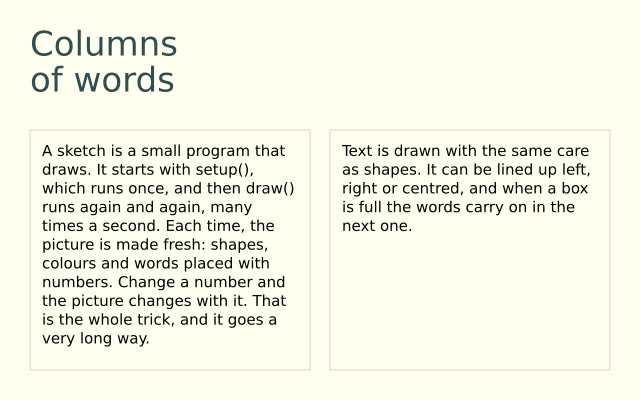
f.text_box() wraps text inside a box and gives back whatever did not fit. That leftover text flows on into the second box, so the story runs across two columns.
How it works
- f.text_box(message, x, y, width, height) breaks the words into lines that fit the width, and stops when the height is full.
- It returns the part it could not show, as text. Pass that to the next f.text_box() call, and the story carries on.
- If the leftover is empty, everything fitted. The example checks "if rest:" to show a warning.
- A "\n" in the message starts a new line. The heading uses one.
- f.text_leading() sets the distance between lines. f.text_leading(None) goes back to automatic, which is 1.25 times the text size.
Make it yours
- Change the box width, 256, or the height, 216, and see where the story breaks.
- Make the text bigger: change f.text_size(15), and watch more of it spill out of the second box.
- Change the line gap: use f.text_leading(22) for the story, instead of None.
- Add a third column: draw another f.rect(), then pass rest to a third f.text_box().
- Write your own words in STORY.
The code
Copy it into a file and run it.
"""Text in boxes and columns

f.text_box() wraps text inside a box and gives back whatever did not fit. That leftover text flows
on into the second box, so the story runs across two columns.

How it works:
- f.text_box(message, x, y, width, height) breaks the words into lines that fit the width, and
  stops when the height is full.
- It returns the part it could not show, as text. Pass that to the next f.text_box() call, and the
  story carries on.
- If the leftover is empty, everything fitted. The example checks "if rest:" to show a warning.
- A "\n" in the message starts a new line. The heading uses one.
- f.text_leading() sets the distance between lines. f.text_leading(None) goes back to automatic,
  which is 1.25 times the text size.

Make it yours:
- Change the box width, 256, or the height, 216, and see where the story breaks.
- Make the text bigger: change f.text_size(15), and watch more of it spill out of the second box.
- Change the line gap: use f.text_leading(22) for the story, instead of None.
- Add a third column: draw another f.rect(), then pass rest to a third f.text_box().
- Write your own words in STORY.
"""
import funground as f

STORY = (
    "A sketch is a small program that draws. It starts with setup(), which runs once, and "
    "then draw() runs again and again, many times a second. Each time, the picture is made "
    "fresh: shapes, colours and words placed with numbers. Change a number and the picture "
    "changes with it. That is the whole trick, and it goes a very long way.\n"
    "Text is drawn with the same care as shapes. It can be lined up left, right or centred, "
    "and when a box is full the words carry on in the next one."
)


def setup():
    f.size(640, 400)


def draw():
    f.background("ivory")
    f.fill("darkslategray")
    f.text_size(34)
    f.text_leading(36)
    f.text("Columns\nof words", 30, 24)

    f.text_size(15)
    f.text_leading(None)                     # back to automatic: 1.25 x the text size
    f.no_fill()
    f.stroke("lightgray")
    f.rect(30, 130, 280, 240)
    f.rect(330, 130, 280, 240)

    f.no_stroke()
    f.fill("black")
    rest = f.text_box(STORY, 42, 142, 256, 216)      # returns what did not fit...
    rest = f.text_box(rest, 342, 142, 256, 216)      # ...which flows on into the next box
    if rest:
        f.fill("firebrick")
        f.text("(more did not fit)", 342, 376)


f.run()