Fonts and styles
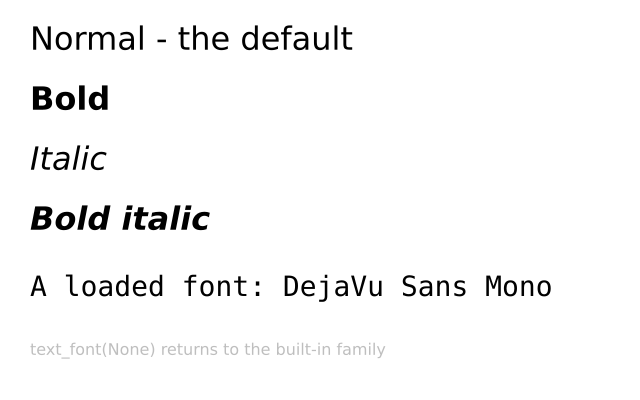
The first four lines use the four built-in styles. The fifth uses a font loaded from a file. The last line goes back to the built-in font.
How it works
- f.text_style() picks one of four styles: "normal", "bold", "italic" or "bold_italic".
- f.load_font() reads a font file from disk and gives you a font to use. The path is relative to the example.
- f.text_font(font, size=28) switches to that font, and can set the size in the same call.
- f.text_font(None) goes back to the built-in family. The style you set before is remembered.
- A font setting stays until you change it. That is why the example resets it at the end.
Make it yours
- Change a line of text, or its size: f.text_size(32) sets the size for the four style lines.
- Change the colour of one line with f.fill() just before it.
- Draw the four styles in a loop over ["normal", "bold", "italic", "bold_italic"].
- Change the size of the loaded font: the 28 in f.text_font(mono, size=28).
- Load a font file of your own and use it in place of "fonts/DejaVuSansMono.ttf".
The code
Copy it into a file and run it.
"""Fonts and styles

The first four lines use the four built-in styles. The fifth uses a font loaded from a file. The
last line goes back to the built-in font.

How it works:
- f.text_style() picks one of four styles: "normal", "bold", "italic" or "bold_italic".
- f.load_font() reads a font file from disk and gives you a font to use. The path is relative to
  the example.
- f.text_font(font, size=28) switches to that font, and can set the size in the same call.
- f.text_font(None) goes back to the built-in family. The style you set before is remembered.
- A font setting stays until you change it. That is why the example resets it at the end.

Make it yours:
- Change a line of text, or its size: f.text_size(32) sets the size for the four style lines.
- Change the colour of one line with f.fill() just before it.
- Draw the four styles in a loop over ["normal", "bold", "italic", "bold_italic"].
- Change the size of the loaded font: the 28 in f.text_font(mono, size=28).
- Load a font file of your own and use it in place of "fonts/DejaVuSansMono.ttf".
"""
import funground as f


def setup():
    f.size(640, 400)


def draw():
    f.background("white")
    f.fill("black")
    f.text_size(32)

    f.text_style("normal")
    f.text("Normal - the default", 30, 20)

    f.text_style("bold")
    f.text("Bold", 30, 80)

    f.text_style("italic")
    f.text("Italic", 30, 140)

    f.text_style("bold_italic")
    f.text("Bold italic", 30, 200)

    mono = f.load_font("fonts/DejaVuSansMono.ttf")
    f.text_font(mono, size=28)
    f.text("A loaded font: DejaVu Sans Mono", 30, 270)

    f.text_font(None)                       # back to the built-in family
    f.text_style("normal")
    f.fill("gray")
    f.text_size(16)
    f.text("text_font(None) returns to the built-in family", 30, 340)


f.run()