Letters as shapes
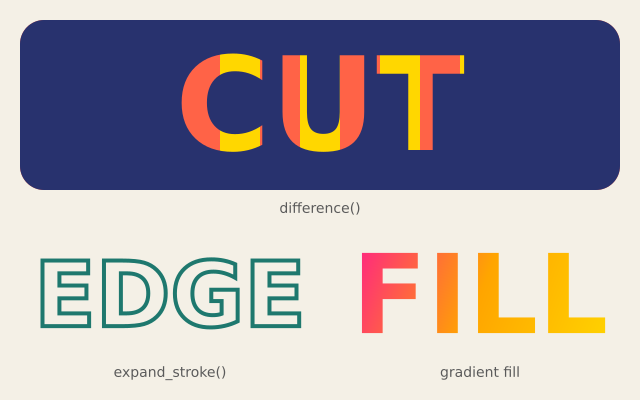
f.text_path() gives the outlines of a word as a path. Here the word CUT is cut out of a panel, the word EDGE shows only its edge, and the word FILL is filled with a gradient.
How it works
- f.text_path(message, x, y) returns a path set exactly as f.text() would set it. It has no colour yet, so you choose one when you draw it.
- panel.difference(word) cuts the letters out of the panel. The stripes behind show through the holes.
- f.clip() keeps the stripes inside the panel shape. f.push() and f.pop() end the clip afterwards.
- expand_stroke(4, join="miter") turns the outline of the letters into a thin shape you can fill. Only the edge is left.
- f.linear_gradient() makes a fill that changes colour along a line. f.draw_path() draws the letters with it.
Make it yours
- Change the words: "CUT", "EDGE" and "FILL" can be any text.
- Change the gradient colours in the list ["deeppink", "orange", "gold"].
- Make the edge thicker: change the 4 in expand_stroke(4, ...), or try join="round".
- Cut a different shape from the panel: use f.path().circle(320, 105, 70) in place of word.
- Change the stripes: use other colours in the f.fill() line, or change 40 for wider stripes.
The code
Copy it into a file and run it.
"""Letters as shapes

f.text_path() gives the outlines of a word as a path. Here the word CUT is cut out of a panel, the
word EDGE shows only its edge, and the word FILL is filled with a gradient.

How it works:
- f.text_path(message, x, y) returns a path set exactly as f.text() would set it. It has no colour
  yet, so you choose one when you draw it.
- panel.difference(word) cuts the letters out of the panel. The stripes behind show through the
  holes.
- f.clip() keeps the stripes inside the panel shape. f.push() and f.pop() end the clip afterwards.
- expand_stroke(4, join="miter") turns the outline of the letters into a thin shape you can fill.
  Only the edge is left.
- f.linear_gradient() makes a fill that changes colour along a line. f.draw_path() draws the
  letters with it.

Make it yours:
- Change the words: "CUT", "EDGE" and "FILL" can be any text.
- Change the gradient colours in the list ["deeppink", "orange", "gold"].
- Make the edge thicker: change the 4 in expand_stroke(4, ...), or try join="round".
- Cut a different shape from the panel: use f.path().circle(320, 105, 70) in place of word.
- Change the stripes: use other colours in the f.fill() line, or change 40 for wider stripes.
"""
import funground as f


def rounded_panel(x, y, w, h, r):
    """A rectangle with round corners, built from two rectangles and four circles."""
    panel = f.path().rect(x + r, y, w - 2 * r, h) | f.path().rect(x, y + r, w, h - 2 * r)
    for cx in (x + r, x + w - r):
        for cy in (y + r, y + h - r):
            panel = panel | f.path().circle(cx, cy, 2 * r)
    return panel


def setup():
    f.size(640, 400)


def draw():
    f.background(244, 240, 230)
    f.text_style("bold")
    f.text_align("center", "center")

    # 1. a panel with the word cut out: the stripes behind show through the letters
    panel = rounded_panel(20, 20, 600, 170, 24)
    f.no_stroke()
    f.push()
    f.clip(panel)
    for i in range(15):
        f.fill("tomato" if i % 2 == 0 else "gold")
        f.rect(20 + i * 40, 20, 40, 170)
    f.pop()
    f.text_size(130)
    word = f.text_path("CUT", 320, 105)
    f.fill(40, 50, 110)
    f.draw_path(panel.difference(word))

    # 2. only the edge of the letters: expand_stroke turns the outline into a shape
    f.text_size(90)
    edge = f.text_path("EDGE", 170, 295).expand_stroke(4, join="miter")
    f.fill(30, 120, 110)
    f.draw_path(edge)

    # 3. the letters filled with a gradient
    f.text_size(110)
    f.fill(f.linear_gradient(340, 240, 620, 350, ["deeppink", "orange", "gold"]))
    f.draw_path(f.text_path("FILL", 480, 295))

    f.text_style("normal")
    f.text_size(14)
    f.fill(90)
    f.text("difference()", 320, 208)
    f.text("expand_stroke()", 170, 372)
    f.text("gradient fill", 480, 372)


f.run()