Spacing and ligatures
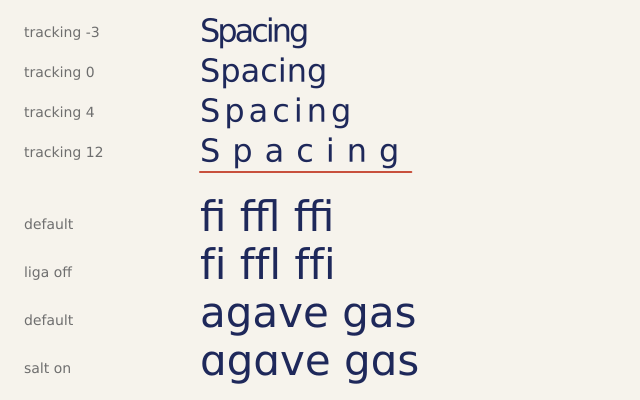
f.text_tracking() adds space after every letter, or takes it away. f.text_features() turns font features on or off by name. The notes on the left say what each line shows.
How it works
- f.text_tracking(n) adds n pixels after each letter. A negative number pulls the letters closer.
- f.text_width() counts the extra space too. The red line is as wide as the widest word.
- f.text_features(liga=False) turns off ligatures. A ligature joins letters, like f and i, into one shape.
- f.text_features(salt=True) picks the font's alternate letters. Look at the a.
- f.text_features() with nothing in the brackets goes back to the font's own choices.
- The label() helper uses f.push() and f.pop() so its own settings do not leak into the sample.
Make it yours
- Change the list [-3, 0, 4, 12] to other tracking values, and the word in f.text("Spacing", ...).
- Try wide tracking on a short heading in capitals. It often looks smart.
- Change the sample words for ligatures. Try "fi", "fl" and "ff" in your own text.
- Turn the ligatures off with f.text_features(liga=False) and look at "fi" and "fl": the letters part.
- Print a width: f.text(f.text_width("Spacing"), 24, 380).
The code
Copy it into a file and run it.
"""Spacing and ligatures

f.text_tracking() adds space after every letter, or takes it away. f.text_features() turns font
features on or off by name. The notes on the left say what each line shows.

How it works:
- f.text_tracking(n) adds n pixels after each letter. A negative number pulls the letters closer.
- f.text_width() counts the extra space too. The red line is as wide as the widest word.
- f.text_features(liga=False) turns off ligatures. A ligature joins letters, like f and i, into one
  shape.
- f.text_features(salt=True) picks the font's alternate letters. Look at the a.
- f.text_features() with nothing in the brackets goes back to the font's own choices.
- The label() helper uses f.push() and f.pop() so its own settings do not leak into the sample.

Make it yours:
- Change the list [-3, 0, 4, 12] to other tracking values, and the word in f.text("Spacing", ...).
- Try wide tracking on a short heading in capitals. It often looks smart.
- Change the sample words for ligatures. Try "fi", "fl" and "ff" in your own text.
- Turn the ligatures off with f.text_features(liga=False) and look at "fi" and "fl": the letters part.
- Print a width: f.text(f.text_width("Spacing"), 24, 380).
"""
import funground as f

SAMPLE_X = 200


def label(text, y):
    """A small grey note on the left."""
    f.push()
    f.text_tracking(0)
    f.text_size(14)
    f.fill(110)
    f.text(text, 24, y + 12)
    f.pop()


def setup():
    f.size(640, 400)


def draw():
    f.background(246, 243, 236)
    f.fill(30, 40, 90)
    f.no_stroke()

    # 1. the same word at four trackings, from tight to wide
    f.text_size(32)
    for i, tracking in enumerate([-3, 0, 4, 12]):
        y = 12 + i * 40
        label(f"tracking {tracking}", y)
        f.text_tracking(tracking)
        f.text("Spacing", SAMPLE_X, y)

    # the red line is text_width() of the widest one: it counts the extra space
    y = 12 + 3 * 40 + 40
    f.stroke(200, 80, 60)
    f.stroke_width(2)
    f.line(SAMPLE_X, y, SAMPLE_X + f.text_width("Spacing"), y)
    f.no_stroke()
    f.text_tracking(0)

    # 2. "liga" joins f, f and i into one shape; look at the dot of the i
    f.text_size(42)
    label("default", 204)
    f.text("fi ffl ffi", SAMPLE_X, 192)
    label("liga off", 252)
    f.text_features(liga=False)
    f.text("fi ffl ffi", SAMPLE_X, 240)
    f.text_features()

    # 3. "salt" picks the font's alternate letters: see the a
    label("default", 300)
    f.text("agave gas", SAMPLE_X, 288)
    label("salt on", 348)
    f.text_features(salt=True)
    f.text("agave gas", SAMPLE_X, 336)
    f.text_features()


f.run()