Mixed styles in one text
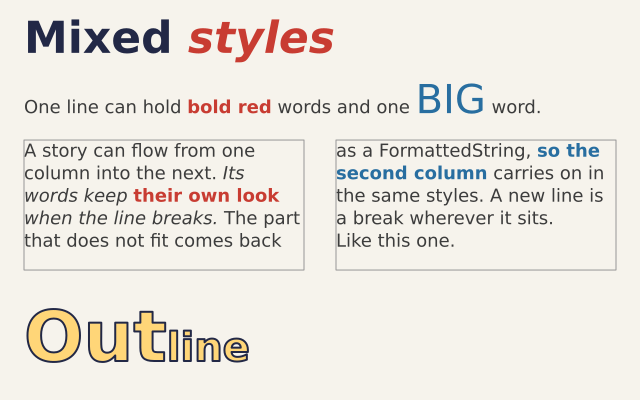
A FormattedString holds runs of text. Each run can have its own size, style and colour. It can be drawn, wrapped into columns, or turned into outlines.
How it works
- f.FormattedString() starts an empty text. .append(text, size=, style=, color=) adds a run, and you can chain the calls.
- A setting you leave out follows the drawing state. The sentence uses the f.text_size() and f.fill() set in draw().
- f.text() draws a FormattedString in one go, and f.text_box() wraps it into a box.
- f.text_box() returns what did not fit, still styled. The second box carries on in the same styles.
- f.text_path() turns a FormattedString into outlines, so "Out" and "line" at different sizes become one shape.
Make it yours
- Change the colours in INK and RED. They are plain (red, green, blue) numbers.
- Add a run to the heading: heading.append("!", size=44, style="italic", color=INK).
- Make the BIG word bigger: change size=40 in that append() call.
- Change the box width, 280, in both f.text_box() calls and watch the lines re-wrap.
- Fill the outline with f.linear_gradient() instead of the flat colour.
The code
Copy it into a file and run it.
"""Mixed styles in one text

A FormattedString holds runs of text. Each run can have its own size, style and colour. It can be
drawn, wrapped into columns, or turned into outlines.

How it works:
- f.FormattedString() starts an empty text. .append(text, size=, style=, color=) adds a run, and
  you can chain the calls.
- A setting you leave out follows the drawing state. The sentence uses the f.text_size() and f.fill()
  set in draw().
- f.text() draws a FormattedString in one go, and f.text_box() wraps it into a box.
- f.text_box() returns what did not fit, still styled. The second box carries on in the same styles.
- f.text_path() turns a FormattedString into outlines, so "Out" and "line" at different sizes
  become one shape.

Make it yours:
- Change the colours in INK and RED. They are plain (red, green, blue) numbers.
- Add a run to the heading: heading.append("!", size=44, style="italic", color=INK).
- Make the BIG word bigger: change size=40 in that append() call.
- Change the box width, 280, in both f.text_box() calls and watch the lines re-wrap.
- Fill the outline with f.linear_gradient() instead of the flat colour.
"""
import funground as f

INK = (34, 40, 70)
RED = (200, 60, 50)

heading = f.FormattedString()
heading.append("Mixed ", size=44, style="bold", color=INK)
heading.append("styles", size=44, style="bold_italic", color=RED)

# the settings left out here (size, colour) come from the drawing state when it is drawn
sentence = f.FormattedString()
sentence.append("One line can hold ")
sentence.append("bold red", style="bold", color=RED)
sentence.append(" words and one ")
sentence.append("BIG", size=40, color=(40, 110, 160))
sentence.append(" word.")

story = f.FormattedString()
story.append("A story can flow from one column into the next. ")
story.append("Its words keep ", style="italic")
story.append("their own look", style="bold", color=RED)
story.append(" when the line breaks. ", style="italic")
story.append("The part that does not fit comes back as a FormattedString, ")
story.append("so the second column", style="bold", color=(40, 110, 160))
story.append(" carries on in the same styles. ")
story.append("A new line is a break wherever it sits.\nLike this one.")

label = f.FormattedString().append("Out", size=70, style="bold").append("line", size=40, style="bold")


def setup():
    f.size(640, 400)


def draw():
    f.background(246, 243, 236)
    f.no_stroke()
    f.fill(60)
    f.text_size(18)

    f.text(heading, 24, 12)
    f.text(sentence, 24, 76)

    # two columns: the first box returns what it could not show
    rest = f.text_box(story, 24, 140, 280, 130)
    f.text_box(rest, 336, 140, 280, 130)
    f.stroke(150)
    f.stroke_width(1)
    f.no_fill()
    f.rect(24, 140, 280, 130)
    f.rect(336, 140, 280, 130)

    # the outlines of a mixed text, drawn as one path
    f.fill(255, 214, 120)
    f.stroke(INK)
    f.stroke_width(2)
    f.draw_path(f.text_path(label, 24, 296))


f.run()