Words made of dots
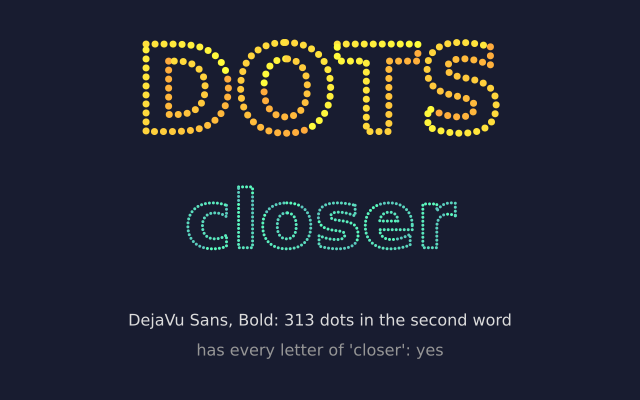
f.text_to_points() walks along the outline of a word and gives back a point every few pixels. Draw a small circle at each point and the word is made of beads.
How it works
- f.text_to_points(message, x, y, spacing) returns a list of (x, y) points along the letters.
- A smaller spacing gives more points. "DOTS" uses 9 and "closer" uses 4.
- The loop draws f.circle() at each point. The colour changes with the point number i, so it shifts along the word.
- It follows f.text_path(), so it works with any font, size, style and alignment you have set.
- f.current_font() tells you which font is in use. font.family(), font.style() and font.contains() say what it is and whether it has the letters you need.
Make it yours
- Change the words, or the spacing numbers 9 and 4.
- Change the dot size: the last number in f.circle(x, y, 7).
- Draw squares instead: use f.rect(x, y, 6, 6) in the loop.
- Make the dots jiggle: add f.random(-2, 2) to x and y.
- Colour by position: use f.map_range(x, 0, f.width, 0, 255) for a colour channel.
The code
Copy it into a file and run it.
"""Words made of dots

f.text_to_points() walks along the outline of a word and gives back a point every few pixels. Draw
a small circle at each point and the word is made of beads.

How it works:
- f.text_to_points(message, x, y, spacing) returns a list of (x, y) points along the letters.
- A smaller spacing gives more points. "DOTS" uses 9 and "closer" uses 4.
- The loop draws f.circle() at each point. The colour changes with the point number i, so it
  shifts along the word.
- It follows f.text_path(), so it works with any font, size, style and alignment you have set.
- f.current_font() tells you which font is in use. font.family(), font.style() and
  font.contains() say what it is and whether it has the letters you need.

Make it yours:
- Change the words, or the spacing numbers 9 and 4.
- Change the dot size: the last number in f.circle(x, y, 7).
- Draw squares instead: use f.rect(x, y, 6, 6) in the loop.
- Make the dots jiggle: add f.random(-2, 2) to x and y.
- Colour by position: use f.map_range(x, 0, f.width, 0, 255) for a colour channel.
"""
import funground as f


def setup():
    f.size(640, 400)


def draw():
    f.background(24, 28, 48)
    f.no_stroke()
    f.text_style("bold")
    f.text_align("center", "center")

    # 1. big dots, far apart
    f.text_size(120)
    for i, (x, y) in enumerate(f.text_to_points("DOTS", 320, 90, 9)):
        f.fill(f.color(255, 170 + (i * 3) % 85, 60))
        f.circle(x, y, 7)

    # 2. small dots, close together: the same idea, a finer look
    f.text_size(80)
    points = f.text_to_points("closer", 320, 220, 4)
    for i, (x, y) in enumerate(points):
        f.fill(f.color(90, 200 + (i * 2) % 55, 190))
        f.circle(x, y, 3)

    # 3. what the font can tell us
    font = f.current_font()
    f.text_style("normal")
    f.text_size(16)
    f.fill(220)
    f.text(f"{font.family()}, {font.style()}: {len(points)} dots in the second word", 320, 320)
    ok = font.contains("closer")
    f.fill(150)
    f.text("has every letter of 'closer': " + ("yes" if ok else "no"), 320, 350)


f.run()