Letters from other fonts
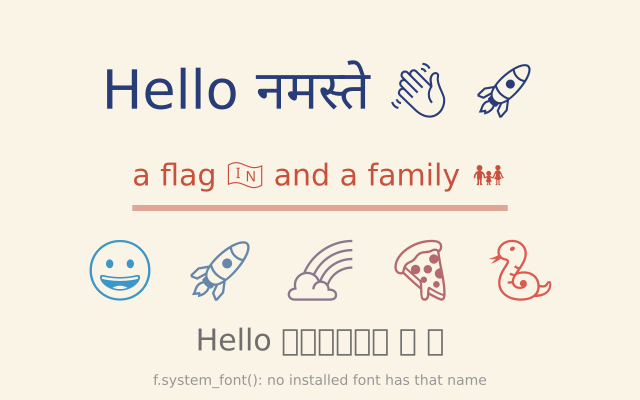
No font has every letter. When the font you use lacks one, funground draws it from another font and keeps the line together. One greeting mixes English, Hindi and emoji, with no extra code.
How it works
- When a letter is missing, funground borrows it from another font. Size and baseline stay the same.
- The emoji have one colour: the colour of the fill. Each one in the row gets its own fill.
- f.text_width() measures the whole line, borrowed letters included. The bar shows that width.
- f.text_fallback(None) turns the help off. The missing letters then show as empty boxes.
- f.system_font() looks for an installed font by its family name. It raises FileNotFoundError if there is none, so setup() catches that.
Make it yours
- Change GREETING to your own words. Try another language or more emoji.
- Change the emoji in the row of five, or the colours in f.color().
- Change the size of the first line: the 54 in f.text_size(54).
- Move the switched-off line: change the 340 in f.text(GREETING, 320, 340), and compare the two greetings.
- Ask for a font you have installed: put its family name in f.system_font() in setup().
The code
Copy it into a file and run it.
"""Letters from other fonts
No font has every letter. When the font you use lacks one, funground draws it from another font and
keeps the line together. One greeting mixes English, Hindi and emoji, with no extra code.
How it works:
- When a letter is missing, funground borrows it from another font. Size and baseline stay the same.
- The emoji have one colour: the colour of the fill. Each one in the row gets its own fill.
- f.text_width() measures the whole line, borrowed letters included. The bar shows that width.
- f.text_fallback(None) turns the help off. The missing letters then show as empty boxes.
- f.system_font() looks for an installed font by its family name. It raises FileNotFoundError if
there is none, so setup() catches that.
Make it yours:
- Change GREETING to your own words. Try another language or more emoji.
- Change the emoji in the row of five, or the colours in f.color().
- Change the size of the first line: the 54 in f.text_size(54).
- Move the switched-off line: change the 340 in f.text(GREETING, 320, 340), and compare the two greetings.
- Ask for a font you have installed: put its family name in f.system_font() in setup().
"""
import funground as f
note = ""
GREETING = "Hello नमस्ते \U0001F44B \U0001F680"
def setup():
global note
f.size(640, 400)
# f.system_font() finds a font that is installed on this computer by its family name.
# It raises FileNotFoundError when there is none. No computer has this one.
try:
f.text_fallback(f.system_font("A Font That Is Not Here"))
note = "found a font"
except FileNotFoundError:
note = "no installed font has that name"
def draw():
f.background(250, 244, 230)
f.no_stroke()
f.text_align("center", "center")
# 1. one line, three fonts
f.fill(40, 60, 120)
f.text_size(54)
f.text(GREETING, 320, 90)
# 2. the same line, big, with its measured width shown as a bar
f.fill(200, 80, 60)
f.text_size(30)
f.text("a flag \U0001F1EE\U0001F1F3 and a family \U0001F468\U0001F469\U0001F467", 320, 175)
width = f.text_width("a flag \U0001F1EE\U0001F1F3 and a family \U0001F468\U0001F469\U0001F467")
f.fill(200, 80, 60, 120)
f.rect(320 - width / 2, 205, width, 6)
# 3. emoji take the colour of the fill
f.text_size(60)
for i, face in enumerate(["\U0001F600", "\U0001F680", "\U0001F308", "\U0001F355", "\U0001F40D"]):
f.fill(f.color(60 + i * 40, 150 - i * 15, 200 - i * 30))
f.text(face, 120 + i * 100, 270)
# 4. fallback switched off: the missing letters are empty boxes
f.push()
f.text_fallback(None)
f.fill(110)
f.text_size(30)
f.text(GREETING, 320, 340)
f.pop()
f.fill(150)
f.text_size(14)
f.text("f.system_font(): " + note, 320, 380)
f.run()