Type on a path
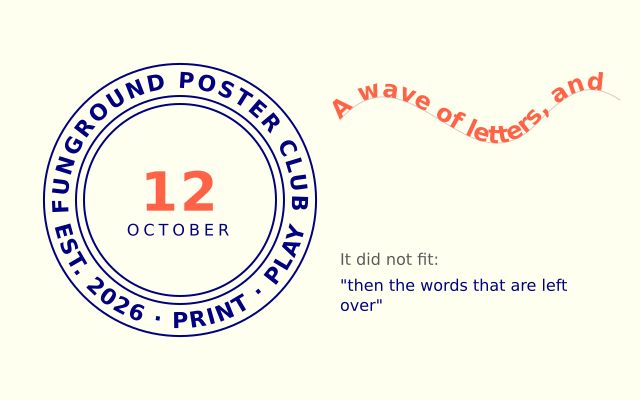
A round stamp with words running round its rim, upright at the top and at the bottom, and a line of text that rides a wave. f.text_on_path() stands each letter on a path and turns it to face along the path.
In the guide: Text › Type on a path
How it works
- f.text_on_path(message, path, offset) sets the message along a path made with f.path(). The message is shaped as a whole first, so ligatures and kerning stay. Then every letter is set on the path.
- A circle from f.path().circle() runs clockwise, so text on it stands on the outside. The words at the bottom use the same circle flipped with .scale(-1, 1) and .translate(), which runs the other way. Its text stands on the inside and still reads from left to right.
- f.text_align("center", "baseline") puts the middle of the text at the middle of the path, with the letters standing on it. A circle starts at its right-hand side, so an offset of 0.785 times the diameter moves the middle of the text up to the top.
- Text that is too long for the path is not drawn. f.text_on_path() returns what did not fit, and the sketch writes it under the wave.
- The thin rings are ordinary lines. The letters are real text, so a PDF of this stamp can be selected and searched.
Make it yours
- Change TOP_WORDS and BOTTOM_WORDS, and the text size, to fill the rim differently.
- Change the offset in the first f.text_on_path() call to turn the words round the badge.
- Draw the wave again with other numbers in f.path().curve_to(), or use a circle, and watch the words follow.
- Try f.text_style("italic") or f.text_tracking(4) before the calls to change the look of the letters.
The code
Copy it into a file and run it.
"""Type on a path

A round stamp with words running round its rim, upright at the top and at the bottom, and a line of text
that rides a wave. f.text_on_path() stands each letter on a path and turns it to face along the path.

How it works:
- f.text_on_path(message, path, offset) sets the message along a path made with f.path(). The message is
  shaped as a whole first, so ligatures and kerning stay. Then every letter is set on the path.
- A circle from f.path().circle() runs clockwise, so text on it stands on the outside. The words at the
  bottom use the same circle flipped with .scale(-1, 1) and .translate(), which runs the other way. Its
  text stands on the inside and still reads from left to right.
- f.text_align("center", "baseline") puts the middle of the text at the middle of the path, with the
  letters standing on it. A circle starts at its right-hand side, so an offset of 0.785 times the diameter
  moves the middle of the text up to the top.
- Text that is too long for the path is not drawn. f.text_on_path() returns what did not fit, and the
  sketch writes it under the wave.
- The thin rings are ordinary lines. The letters are real text, so a PDF of this stamp can be selected and
  searched.

Make it yours:
- Change TOP_WORDS and BOTTOM_WORDS, and the text size, to fill the rim differently.
- Change the offset in the first f.text_on_path() call to turn the words round the badge.
- Draw the wave again with other numbers in f.path().curve_to(), or use a circle, and watch the words follow.
- Try f.text_style("italic") or f.text_tracking(4) before the calls to change the look of the letters.
"""
import funground as f

TOP_WORDS = "FUNGROUND POSTER CLUB"
BOTTOM_WORDS = "EST. 2026 · PRINT · PLAY"
WAVE_WORDS = "A wave of letters, and then the words that are left over"
CENTRE = (180, 200)
RIM = 112                        # the radius of the ring the top words stand on
SIZE = 22
CAP_HEIGHT = 0.73 * SIZE        # how tall the capital letters stand


def setup():
    f.size(640, 400)


def draw():
    f.background("ivory")
    x, y = CENTRE

    # The stamp: two rings, with the words standing between them.
    f.no_fill()
    f.stroke("navy")
    f.stroke_width(2)
    f.circle(x, y, 2 * (RIM - 8))
    f.circle(x, y, 2 * (RIM + CAP_HEIGHT + 8))
    f.circle(x, y, 2 * (RIM - 16))

    f.no_stroke()
    f.fill("navy")
    f.text_size(SIZE)
    f.text_style("bold")
    f.text_tracking(2)
    f.text_align("center", "baseline")

    # Clockwise circle: the words stand on the outside, centred at the top.
    top = f.path().circle(x, y, 2 * RIM)
    f.text_on_path(TOP_WORDS, top, offset=0.785 * 2 * RIM)

    # The same circle, flipped to run the other way, a little wider so the letters fit the band.
    r = RIM + CAP_HEIGHT
    bottom = f.path().circle(x, y, 2 * r).scale(-1, 1).translate(2 * x, 0)
    f.text_on_path(BOTTOM_WORDS, bottom, offset=-0.785 * 2 * r)

    f.text_size(54)
    f.fill("tomato")
    f.text_align("center", "center")
    f.text("12", x, y - 8)
    f.text_size(16)
    f.text_style("normal")
    f.fill("navy")
    f.text_tracking(4)
    f.text("OCTOBER", x, y + 30)

    # A wave: the path is a curve, and the letters turn to follow it.
    f.text_tracking(0)
    f.text_size(24)
    f.text_style("bold")
    f.text_align("left", "baseline")
    wave = f.path().move_to(340, 120).curve_to(410, 40, 470, 200, 540, 120).curve_to(570, 90, 590, 80, 620, 100)
    f.no_fill()
    f.stroke(220, 200, 190)
    f.stroke_width(1)
    f.draw_path(wave)
    f.no_stroke()
    f.fill("tomato")
    rest = f.text_on_path(WAVE_WORDS, wave)

    f.text_style("normal")
    f.text_size(16)
    f.fill(90)
    f.text_align("left", "top")
    f.text("It did not fit:", 340, 250)
    f.fill("navy")
    f.text_box('"' + rest.strip() + '"', 340, 276, 270, 80)


f.run()