saved_state and angles
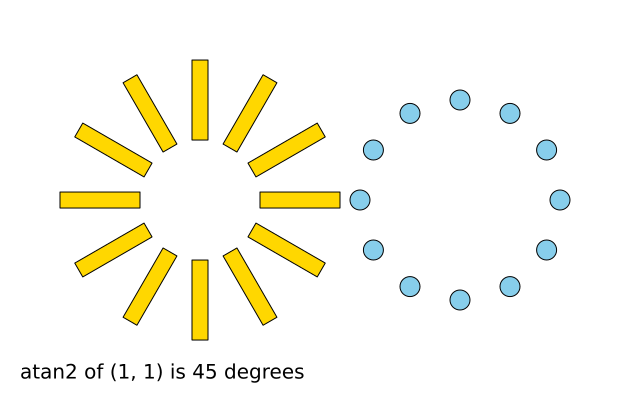
Two rings of twelve shapes. The gold bars are placed with rotate(). The blue dots are placed with sine and cosine. The text at the bottom turns a maths answer back into degrees.
How it works
- with f.saved_state(): is f.push() and f.pop() in one block. Whatever the block changes is undone at the end.
- Inside the block, f.translate() and f.rotate() turn each bar around the centre (200, 200). The blue ring is then not affected.
- f.rotate() takes degrees. Python's math.sin and math.cos want radians, so f.radians() converts.
- The blue ring uses x = centre + radius * cos(angle) and y = centre + radius * sin(angle). It is the same kind of ring, made another way.
- f.degrees() goes the other way, so atan2 gives 45 degrees for the point (1, 1).
Make it yours
- Change the 30 in range(0, 360, 30) to 20 or 45 and see how many bars you get.
- Change the radius 100 in the blue ring, or the bar length 80.
- Make the bars turn: use f.rotate(angle + f.frame_count) in draw().
- Colour each bar differently: put f.fill(f.color(angle % 255, 100, 200)) inside the block.
- Draw the blue dots with a smaller step and a smaller circle for a smoother ring.
The code
Copy it into a file and run it.
"""saved_state and angles

Two rings of twelve shapes. The gold bars are placed with rotate(). The blue dots are placed with
sine and cosine. The text at the bottom turns a maths answer back into degrees.

How it works:
- with f.saved_state(): is f.push() and f.pop() in one block. Whatever the block changes is undone
  at the end.
- Inside the block, f.translate() and f.rotate() turn each bar around the centre (200, 200). The
  blue ring is then not affected.
- f.rotate() takes degrees. Python's math.sin and math.cos want radians, so f.radians() converts.
- The blue ring uses x = centre + radius * cos(angle) and y = centre + radius * sin(angle). It is
  the same kind of ring, made another way.
- f.degrees() goes the other way, so atan2 gives 45 degrees for the point (1, 1).

Make it yours:
- Change the 30 in range(0, 360, 30) to 20 or 45 and see how many bars you get.
- Change the radius 100 in the blue ring, or the bar length 80.
- Make the bars turn: use f.rotate(angle + f.frame_count) in draw().
- Colour each bar differently: put f.fill(f.color(angle % 255, 100, 200)) inside the block.
- Draw the blue dots with a smaller step and a smaller circle for a smoother ring.
"""
import math

import funground as f


def setup():
    f.size(640, 400)


def draw():
    f.background("white")
    f.fill("gold")
    f.stroke("black")
    for angle in range(0, 360, 30):
        with f.saved_state():
            f.translate(200, 200)
            f.rotate(angle)
            f.rect(60, -8, 80, 16)
    # the same ring drawn with trigonometry instead of rotate()
    f.fill("skyblue")
    for angle in range(0, 360, 30):
        x = 460 + 100 * math.cos(f.radians(angle))
        y = 200 + 100 * math.sin(f.radians(angle))
        f.circle(x, y, 20)
    f.fill("black")
    f.text(f"atan2 of (1, 1) is {f.degrees(math.atan2(1, 1)):.0f} degrees", 20, 360)


f.run()