Shear and matrices
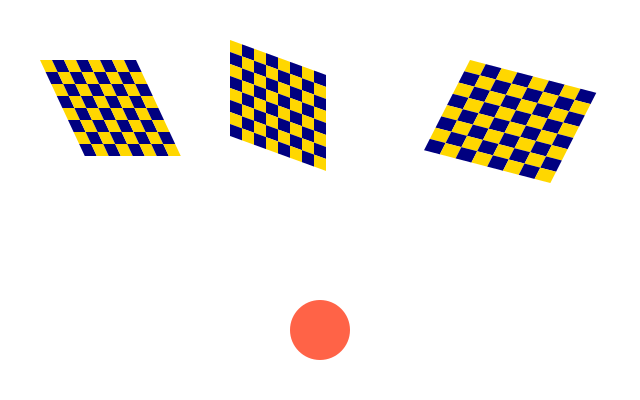
Three chequerboards: one leaning to the right, one climbing to the right, and one rotated and stretched with a single matrix. A red circle ignores the transform.
How it works
- f.shear_x() slants everything drawn afterwards sideways. f.shear_y() slants it up and down. Both take degrees.
- f.apply_matrix() multiplies in any transform at once. The third board turns and stretches in one go.
- Its six numbers are a, b, c and d, which turn and stretch, then the two that move the board.
- f.reset_matrix() forgets every transform inside the block, so the circle uses plain window coordinates.
- Each board sits in a with f.saved_state(): block, so one board's transform does not touch the next.
Make it yours
- Change the 25 in f.shear_x(25): try 45, or a negative number.
- Change the 1.4 in f.apply_matrix(): it is the sideways stretch. 1.0 means no stretch.
- Change the angle in math.radians(20) to 45 and see the third board turn.
- Make the board bigger: checker(12, 8) in place of checker() draws a 12 by 12 board of 8 pixel cells.
- Add a fourth board that uses f.shear_x() and f.shear_y() together.
The code
Copy it into a file and run it.
"""Shear and matrices

Three chequerboards: one leaning to the right, one climbing to the right, and one rotated and
stretched with a single matrix. A red circle ignores the transform.

How it works:
- f.shear_x() slants everything drawn afterwards sideways. f.shear_y() slants it up and down. Both
  take degrees.
- f.apply_matrix() multiplies in any transform at once. The third board turns and stretches in one
  go.
- Its six numbers are a, b, c and d, which turn and stretch, then the two that move the board.
- f.reset_matrix() forgets every transform inside the block, so the circle uses plain window
  coordinates.
- Each board sits in a with f.saved_state(): block, so one board's transform does not touch the
  next.

Make it yours:
- Change the 25 in f.shear_x(25): try 45, or a negative number.
- Change the 1.4 in f.apply_matrix(): it is the sideways stretch. 1.0 means no stretch.
- Change the angle in math.radians(20) to 45 and see the third board turn.
- Make the board bigger: checker(12, 8) in place of checker() draws a 12 by 12 board of 8 pixel cells.
- Add a fourth board that uses f.shear_x() and f.shear_y() together.
"""
import math

import funground as f


def setup():
    f.size(640, 400)


def checker(size=8, cell=12):
    for row in range(size):
        for col in range(size):
            f.fill("navy" if (row + col) % 2 else "gold")
            f.rect(col * cell, row * cell, cell, cell)


def draw():
    f.background("white")
    f.no_stroke()
    with f.saved_state():
        f.translate(40, 60)
        f.shear_x(25)                     # leans to the right
        checker()
    with f.saved_state():
        f.translate(230, 40)
        f.shear_y(20)                     # climbs to the right
        checker()
    with f.saved_state():
        a = math.radians(20)              # rotate by 20 degrees and stretch sideways, in one matrix
        f.apply_matrix(1.4 * math.cos(a), math.sin(a), -1.4 * math.sin(a), math.cos(a), 470, 60)
        checker()
        with f.saved_state():
            f.reset_matrix()              # back to plain window coordinates
            f.fill("tomato")
            f.circle(320, 330, 60)


f.run()