Drag the outline
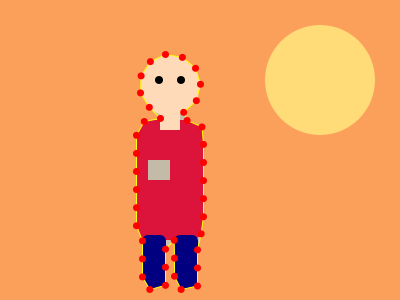
A drawn person is cut out of a drawn room and set in front of a new sky. Red dots mark the outline of the cut-out. Drag a dot with the mouse and the shape that cuts the picture follows it. Pull a dot in to trim the person, or push it out to show more of the room.
In the guide: Paths, clipping and pictures › Stand in front of any picture
How it works
- picture.remove_background(empty, tolerance=30, tidy=True) removes the room. The ball on the floor is a speck, so tidy drops it. The pocket is the colour of the wall, so it is a hole, and tidy fills it with the picture's own colours.
- picture.outline(40) gives the border of what is left as a list of 40 (x, y) points, spread evenly along it.
- f.path().polygon(points) turns the list into a shape. f.draw_path() draws its yellow line.
- f.clip(path) inside f.saved_state() draws the photo only inside the shape. Because the shape is built again in every frame, a point you move changes the cut at once.
- mouse_pressed() grabs the nearest dot, mouse_dragged() moves it and mouse_released() lets go.
Make it yours
- Change POINTS to 12, then 120. See how few dots still cut the person well.
- Drag a dot far out. What does the cut show there?
- Draw a different person in draw_figure(), or move the ball next to the legs.
- Add a key_pressed() that prints points, so you can keep your own correction.
The code
Copy it into a file and run it.
"""Drag the outline

A drawn person is cut out of a drawn room and set in front of a new sky. Red dots mark the outline of the cut-out. Drag a
dot with the mouse and the shape that cuts the picture follows it. Pull a dot in to trim the person, or push it out to
show more of the room.

How it works:
- picture.remove_background(empty, tolerance=30, tidy=True) removes the room. The ball on the floor is a speck, so tidy
  drops it. The pocket is the colour of the wall, so it is a hole, and tidy fills it with the picture's own colours.
- picture.outline(40) gives the border of what is left as a list of 40 (x, y) points, spread evenly along it.
- f.path().polygon(points) turns the list into a shape. f.draw_path() draws its yellow line.
- f.clip(path) inside f.saved_state() draws the photo only inside the shape. Because the shape is built again in every
  frame, a point you move changes the cut at once.
- mouse_pressed() grabs the nearest dot, mouse_dragged() moves it and mouse_released() lets go.

Make it yours:
- Change POINTS to 12, then 120. See how few dots still cut the person well.
- Drag a dot far out. What does the cut show there?
- Draw a different person in draw_figure(), or move the ball next to the legs.
- Add a key_pressed() that prints points, so you can keep your own correction.
"""
import funground as f

WIDTH, HEIGHT = 400, 300
POINTS = 40
points = []                                    # the outline: a list of (x, y)
grabbed = None                                 # the index of the dot being dragged
photo = None


def make_room():
    """A drawn wall with stripes and a floor: the room with nobody in it."""
    g = f.create_graphics(WIDTH, HEIGHT)
    g.background(196, 186, 168)
    g.no_stroke()
    g.fill(204, 194, 176)
    for x in range(0, WIDTH, 40):
        g.rect(x, 0, 20, HEIGHT)
    g.fill(120, 96, 80)
    g.rect(0, 250, WIDTH, 50)
    return g


def draw_figure(g, x):
    """A person standing at x, a pocket in the colour of the wall, and a ball on the floor."""
    g.no_stroke()
    g.fill("crimson")
    g.rect(x - 34, 120, 68, 120, 14)           # body
    g.fill(196, 186, 168)
    g.rect(x - 22, 160, 22, 20)                # the pocket: a hole in the cut-out
    g.fill("navy")
    g.rect(x - 28, 235, 24, 55, 6)             # legs
    g.rect(x + 4, 235, 24, 55, 6)
    g.fill("peachpuff")
    g.rect(x - 10, 105, 20, 25)                # neck: it joins the head to the body
    g.circle(x, 85, 62)                        # head
    g.fill("black")
    g.circle(x - 11, 80, 8)
    g.circle(x + 11, 80, 8)
    g.fill("gold")
    g.circle(350, 275, 30)                     # the ball: a speck


def setup():
    global photo, points
    f.size(WIDTH, HEIGHT)
    empty = make_room()
    photo = empty.copy()
    draw_figure(photo, 170)
    cutout = photo.copy()
    cutout.remove_background(empty, tolerance=30, tidy=True)
    points = cutout.outline(POINTS)


def mouse_pressed():
    global grabbed
    grabbed = min(range(len(points)), key=lambda i: (points[i][0] - f.mouse_x) ** 2 + (points[i][1] - f.mouse_y) ** 2)


def mouse_dragged():
    if grabbed is not None:
        points[grabbed] = (f.mouse_x, f.mouse_y)


def mouse_released():
    global grabbed
    grabbed = None


def draw():
    f.background(250, 160, 90)                 # the new sky
    f.no_stroke()
    f.fill(255, 220, 120)
    f.circle(320, 80, 110)
    shape = f.path().polygon(points)
    with f.saved_state():
        f.clip(shape)                          # draw only inside the outline
        f.image(photo, 0, 0)
    f.no_fill()
    f.stroke("yellow")
    f.draw_path(shape)
    f.no_stroke()
    f.fill("red")
    for x, y in points:
        f.circle(x, y, 7)


f.run()