In front of a picture
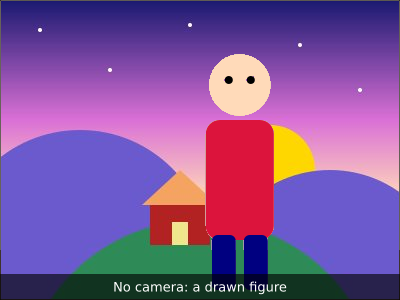
You, standing in front of a sunset. Press E while you are out of view, so the camera sees the empty room. Then step back in: whatever looks like the empty room becomes see-through, and the sunset shows behind you. With no camera, a drawn figure sways in a drawn room, so it always works.
In the guide: Paths, clipping and pictures › Stand in front of any picture
How it works
- cam.picture() is a still copy of the latest frame. Take one of the empty room and keep it.
- picture.remove_background(empty, tolerance=30) makes every pixel see-through that is almost the same as the same pixel of the empty room. The tolerance is how different a pixel may be and still count as the same.
- A camera flickers a little, even in a still room, so a tolerance of 0 rarely works. Raise it if specks are left.
- Draw the new background first with f.image(). Then draw the cut-out picture on top: you are in front.
- picture.remove_color() does the same for one colour, such as a green cloth, with no empty room.
Make it yours
- Change TOLERANCE to 10, then 80. See what is left behind each time.
- Hang a green cloth behind you and use picture.remove_color("green", tolerance=60) instead.
- Draw a moving background in place of the photo, such as drifting circles.
- Draw something between the background and you, such as f.text(), for a title behind your head.
The code
Copy it into a file and run it.
"""In front of a picture

You, standing in front of a sunset. Press E while you are out of view, so the camera sees the empty room. Then step
back in: whatever looks like the empty room becomes see-through, and the sunset shows behind you. With no camera, a
drawn figure sways in a drawn room, so it always works.

How it works:
- cam.picture() is a still copy of the latest frame. Take one of the empty room and keep it.
- picture.remove_background(empty, tolerance=30) makes every pixel see-through that is almost the same as the same
  pixel of the empty room. The tolerance is how different a pixel may be and still count as the same.
- A camera flickers a little, even in a still room, so a tolerance of 0 rarely works. Raise it if specks are left.
- Draw the new background first with f.image(). Then draw the cut-out picture on top: you are in front.
- picture.remove_color() does the same for one colour, such as a green cloth, with no empty room.

Make it yours:
- Change TOLERANCE to 10, then 80. See what is left behind each time.
- Hang a green cloth behind you and use picture.remove_color("green", tolerance=60) instead.
- Draw a moving background in place of the photo, such as drifting circles.
- Draw something between the background and you, such as f.text(), for a title behind your head.
"""
import math

import funground as f
from funground import camera

WIDTH, HEIGHT = 400, 300
TOLERANCE = 30
sunset = f.load_image("data/photo.jpg")       # the new background
cam = None
empty = None                                   # the room with nobody in it
room = None                                    # the drawn room, for when there is no camera


def open_camera():
    try:
        cam = camera.open()
        cam.start(WIDTH, HEIGHT)
        return cam
    except RuntimeError:
        return None


def make_room():
    """A drawn wall with soft stripes: the room to stand in when there is no camera."""
    g = f.create_graphics(WIDTH, HEIGHT)
    g.background(196, 186, 168)
    g.no_stroke()
    g.fill(204, 194, 176)
    for x in range(0, WIDTH, 40):
        g.rect(x, 0, 20, HEIGHT)
    g.fill(120, 96, 80)
    g.rect(0, 250, WIDTH, 50)                  # the floor
    return g


def draw_figure(g, x):
    """A simple person, standing at x."""
    g.no_stroke()
    g.fill("crimson")
    g.rect(x - 34, 120, 68, 120, 14)           # body
    g.fill("navy")
    g.rect(x - 28, 235, 24, 55, 6)             # legs
    g.rect(x + 4, 235, 24, 55, 6)
    g.fill("peachpuff")
    g.circle(x, 85, 62)                        # head
    g.fill("black")
    g.circle(x - 11, 80, 8)
    g.circle(x + 11, 80, 8)


def setup():
    global cam, room
    f.size(WIDTH, HEIGHT)
    cam = open_camera()
    room = make_room()


def key_pressed():
    global empty
    if f.key == "e" and cam is not None and cam.is_ready():
        empty = cam.picture()                  # step out of view first


def draw():
    f.image(sunset, 0, 0)

    live = cam is not None and cam.is_ready()
    if live:
        me = cam.picture()
        target = empty
    else:
        me = room.copy()                       # the same room, a little lighter, as a camera's light changes
        me.fill(255, 255, 255, 10)
        me.rect(0, 0, WIDTH, HEIGHT)
        draw_figure(me, 200 + 60 * math.sin(f.frame_count / 12))
        target = room
    if target is not None:
        me.remove_background(target, tolerance=TOLERANCE)
    f.image(me, 0, 0)                          # you, in front of the sunset

    f.no_stroke()
    f.fill(0, 0, 0, 160)
    f.rect(0, HEIGHT - 26, WIDTH, 26)
    f.fill("white")
    f.text_size(13)
    f.text_align("center", "center")
    if live:
        message = "Press E with the room empty" if empty is None else "In front of the sunset"
    else:
        message = "No camera: a drawn figure"
    f.text(message, WIDTH / 2, HEIGHT - 13)


f.run(fps=24)