You as a line drawing
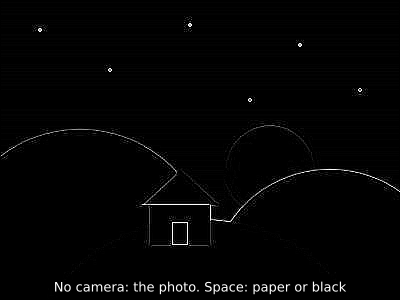
The camera turned into lines, live. Wherever the picture changes from light to dark there is a line, so your face, your hands and the room become a moving drawing. Press Space to switch between white lines on black and dark lines on paper. With no camera, the photo is drawn in lines.
In the guide: Paths, clipping and pictures › Changing pictures: copy, resize, mask and filters
How it works
- cam.picture() gives the camera's latest frame as an ordinary picture, which is yours to change.
- picture.filter("edges") keeps only the outlines: white where the brightness changes, black where it stays the same. Colours of the same brightness make no line.
- picture.filter("invert") then swaps black and white, for dark lines on paper.
- f.image() draws the changed picture. The camera itself is never changed: each frame starts from a new copy.
Make it yours
- Blur first, with picture.filter("blur", 2), for fewer, calmer lines.
- Draw the camera itself, then the lines on top with f.opacity(120), for an outlined photo.
- Use f.tint("gold") before f.image() for coloured lines.
- Try f.filter("edges") on your own drawings, not only on the camera.
The code
Copy it into a file and run it.
"""You as a line drawing

The camera turned into lines, live. Wherever the picture changes from light to dark there is a line, so your face,
your hands and the room become a moving drawing. Press Space to switch between white lines on black and dark lines
on paper. With no camera, the photo is drawn in lines.

How it works:
- cam.picture() gives the camera's latest frame as an ordinary picture, which is yours to change.
- picture.filter("edges") keeps only the outlines: white where the brightness changes, black where it stays the
  same. Colours of the same brightness make no line.
- picture.filter("invert") then swaps black and white, for dark lines on paper.
- f.image() draws the changed picture. The camera itself is never changed: each frame starts from a new copy.

Make it yours:
- Blur first, with picture.filter("blur", 2), for fewer, calmer lines.
- Draw the camera itself, then the lines on top with f.opacity(120), for an outlined photo.
- Use f.tint("gold") before f.image() for coloured lines.
- Try f.filter("edges") on your own drawings, not only on the camera.
"""
import funground as f
from funground import camera

WIDTH, HEIGHT = 400, 300
photo = f.load_image("data/photo.jpg")       # drawn in lines when there is no camera
cam = None
on_paper = False


def open_camera():
    try:
        cam = camera.open()
        cam.start(WIDTH, HEIGHT)
        return cam
    except RuntimeError:
        return None


def setup():
    global cam
    f.size(WIDTH, HEIGHT)
    cam = open_camera()


def key_pressed():
    global on_paper
    if f.key == " ":
        on_paper = not on_paper


def draw():
    live = cam is not None and cam.is_ready()
    picture = cam.picture() if live else photo.copy()
    picture.filter("edges")
    if on_paper:
        picture.filter("invert")
    f.image(picture, 0, 0)

    f.no_stroke()
    f.fill(0, 0, 0, 160)
    f.rect(0, HEIGHT - 26, WIDTH, 26)
    f.fill("white")
    f.text_size(13)
    f.text_align("center", "center")
    f.text(("" if live else "No camera: the photo. ") + "Space: paper or black", WIDTH / 2, HEIGHT - 13)


f.run(fps=24)