Play a take
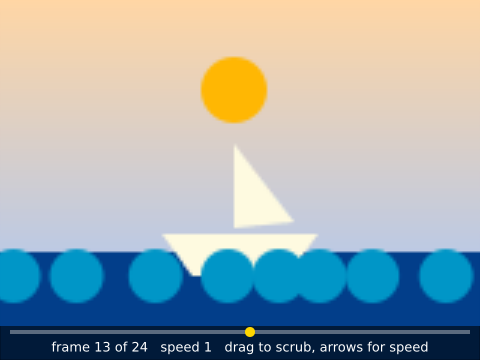
A short video, played back under your control. Drag across the picture to scrub through it, frame by frame. The arrow keys change the speed, and below zero it plays backwards. Space pauses. It plays your own take.gif when one is next to the sketch (save one with the photo booth), and a little film of a paper boat when there is none.
How it works
- camera.load_clip("take.gif") reads an animated GIF into a clip: len(clip) counts its frames, clip.frame(i) gives frame i as a picture, and clip.fps is how fast it was made to play.
- The sketch keeps a playhead, a number that can sit between two frames. Each frame of the sketch moves it on by speed * clip.fps / 30, so speed 1 plays the clip at its own pace, 2 twice as fast, -1 backwards.
- int(playhead) % len(clip) picks the frame to show, so the clip loops both ways.
- While the mouse is pressed, f.map_range() turns the mouse's x into a frame number: that is scrubbing.
- try and except FileNotFoundError fall back to the boat when there is no take.gif.
Make it yours
- Make it a boomerang: when the playhead reaches the end, turn the speed round.
- Leave a trail: draw the two frames before this one first, with f.opacity(60).
- Save the frame on the screen with f.save("still.png") when you press S.
- Try f.filter("posterize", 4) after drawing the frame.
The code
Copy it into a file and run it.
"""Play a take

A short video, played back under your control. Drag across the picture to scrub through it, frame by frame. The
arrow keys change the speed, and below zero it plays backwards. Space pauses. It plays your own take.gif when one
is next to the sketch (save one with the photo booth), and a little film of a paper boat when there is none.

How it works:
- camera.load_clip("take.gif") reads an animated GIF into a clip: len(clip) counts its frames, clip.frame(i) gives
  frame i as a picture, and clip.fps is how fast it was made to play.
- The sketch keeps a playhead, a number that can sit between two frames. Each frame of the sketch moves it on
  by speed * clip.fps / 30, so speed 1 plays the clip at its own pace, 2 twice as fast, -1 backwards.
- int(playhead) % len(clip) picks the frame to show, so the clip loops both ways.
- While the mouse is pressed, f.map_range() turns the mouse's x into a frame number: that is scrubbing.
- try and except FileNotFoundError fall back to the boat when there is no take.gif.

Make it yours:
- Make it a boomerang: when the playhead reaches the end, turn the speed round.
- Leave a trail: draw the two frames before this one first, with f.opacity(60).
- Save the frame on the screen with f.save("still.png") when you press S.
- Try f.filter("posterize", 4) after drawing the frame.
"""
import funground as f
from funground import camera

WIDTH, HEIGHT = 480, 360
try:
    take = camera.load_clip("take.gif")      # your own take, next to the sketch
except FileNotFoundError:
    take = camera.load_clip("data/take.gif") # the paper boat
playhead = 0.0
speed = 1.0
paused = False


def setup():
    f.size(WIDTH, HEIGHT)
    f.text_align("center", "center")


def key_pressed():
    global speed, paused
    if f.key == "right":
        speed = min(3.0, speed + 0.5)
    elif f.key == "left":
        speed = max(-3.0, speed - 0.5)
    elif f.key == " ":
        paused = not paused


def draw():
    global playhead
    if f.is_mouse_pressed:
        playhead = f.map_range(f.mouse_x, 0, WIDTH, 0, len(take) - 1, clamp=True)
    elif not paused:
        playhead += speed * take.fps / 30
    frame = int(playhead) % len(take)
    f.image(take.frame(frame), 0, 0, WIDTH, HEIGHT)

    f.no_stroke()
    f.fill(0, 0, 0, 150)
    f.rect(0, HEIGHT - 34, WIDTH, 34)
    f.fill(255, 255, 255, 90)
    f.rect(10, HEIGHT - 30, WIDTH - 20, 4)                       # the timeline
    f.fill("gold")
    f.circle(10 + (WIDTH - 20) * frame / max(1, len(take) - 1), HEIGHT - 28, 10)
    f.fill("white")
    f.text_size(13)
    state = "paused" if paused else f"speed {speed:g}"
    f.text(f"frame {frame + 1} of {len(take)}   {state}   drag to scrub, arrows for speed", WIDTH / 2, HEIGHT - 13)


f.run(fps=30)