Photo booth
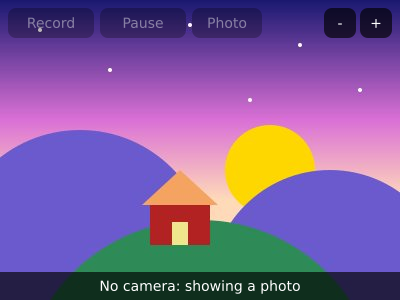
The camera, live on the canvas, with buttons along the top. Record starts a take and Stop ends it; Pause holds it in between. While a take is recording, the picture has a red frame, a blinking light and a timer, and while it is paused the frame turns amber. Stop saves the take as take.gif, and the sound heard during it as take.wav. Photo saves a still picture, and - and + zoom in for a close-up. With no camera, it shows a photo.
In the guide: Paths, clipping and pictures › The camera
How it works
- camera.open() makes a camera object, and cam.start() opens it. f.image(cam, ...) draws its latest frame, here only its middle part when zoomed in.
- cam.record(MAX_TAKE) starts a clip that keeps one frame for each frame the sketch draws. clip.pause() and clip.resume() hold and continue it, and clip.stop() ends it. clip.save("take.gif") writes the animated GIF.
- mic.capture(seconds) gives the sound of the last few seconds as a sound. The sketch takes one piece of sound each time a recording stretch ends (Pause or Stop), joins them with sound.sequence() and saves take.wav, so the sound fits the frames even when you paused.
- The buttons are rectangles the sketch draws. mouse_pressed() checks which one the mouse is inside.
- cam.save("photo.png") writes a still photo. camera.names() lists the cameras, and the sketch prints them. With no camera or no microphone the sketch still runs.
Make it yours
- Change MAX_TAKE for longer takes, up to 10 seconds.
- Change f.run(fps=15) to 10 for a smaller file, or to 24 for smoother movement.
- Add f.tint("gold") or another colour before f.image() for a coloured filter.
- Number the files, such as "take-1.gif", "take-2.gif", so a new take does not replace the last one.
- Load take.gif and take.wav in another sketch and make the video react to the sound.
The code
Copy it into a file and run it.
"""Photo booth

The camera, live on the canvas, with buttons along the top. Record starts a take and Stop ends it; Pause holds
it in between. While a take is recording, the picture has a red frame, a blinking light and a timer, and while
it is paused the frame turns amber. Stop saves the take as take.gif, and the sound heard during it as take.wav.
Photo saves a still picture, and - and + zoom in for a close-up. With no camera, it shows a photo.

How it works:
- camera.open() makes a camera object, and cam.start() opens it. f.image(cam, ...) draws its latest frame, here
  only its middle part when zoomed in.
- cam.record(MAX_TAKE) starts a clip that keeps one frame for each frame the sketch draws. clip.pause() and
  clip.resume() hold and continue it, and clip.stop() ends it. clip.save("take.gif") writes the animated GIF.
- mic.capture(seconds) gives the sound of the last few seconds as a sound. The sketch takes one piece of sound
  each time a recording stretch ends (Pause or Stop), joins them with sound.sequence() and saves take.wav, so the
  sound fits the frames even when you paused.
- The buttons are rectangles the sketch draws. mouse_pressed() checks which one the mouse is inside.
- cam.save("photo.png") writes a still photo. camera.names() lists the cameras, and the sketch prints them. With
  no camera or no microphone the sketch still runs.

Make it yours:
- Change MAX_TAKE for longer takes, up to 10 seconds.
- Change f.run(fps=15) to 10 for a smaller file, or to 24 for smoother movement.
- Add f.tint("gold") or another colour before f.image() for a coloured filter.
- Number the files, such as "take-1.gif", "take-2.gif", so a new take does not replace the last one.
- Load take.gif and take.wav in another sketch and make the video react to the sound.
"""
import funground as f
from funground import sound
from funground import camera

WIDTH, HEIGHT = 400, 300
FPS = 15
MAX_TAKE = 10           # seconds of recording a take can hold
BUTTONS = {"record": (8, 8, 86, 30), "pause": (100, 8, 86, 30), "photo": (192, 8, 70, 30),
           "zoom out": (WIDTH - 76, 8, 32, 30), "zoom in": (WIDTH - 40, 8, 32, 30)}      # x, y, width, height

photo = f.load_image("data/photo.jpg")       # shown when there is no camera
cam = None
mic = None
take = None                                  # the clip being recorded, or None
stretch_start = 0                            # the clip's length when the current recording stretch began
sounds = []                                  # the sound of each recording stretch
zoom = 1.0
message = ""
saving = 0                                   # frames until the take is saved: 2 after Stop, so "Saving" shows first


def open_camera():
    """The camera, started, or None when this computer has none or will not share it."""
    try:
        cam = camera.open()
        cam.start(WIDTH, HEIGHT)
        return cam
    except RuntimeError:
        return None


def open_microphone():
    try:
        microphone = sound.microphone()
        microphone.start()
        return microphone
    except RuntimeError:
        return None


def setup():
    global cam, mic
    f.size(WIDTH, HEIGHT)
    f.text_align("center", "center")
    print("Cameras:", camera.names())
    cam = open_camera()
    mic = open_microphone()


def keep_sound():
    """The sound of the stretch that has just ended, so take.wav lines up with the frames."""
    seconds = (len(take) - stretch_start) / FPS
    if mic is not None and seconds > 0:
        sounds.append(mic.capture(seconds))


def record_or_stop():
    global take, stretch_start, sounds, message
    if take is None:
        take = cam.record(MAX_TAKE)
        stretch_start, sounds, message = 0, [], ""
        return
    global saving
    if not take.is_paused():
        keep_sound()
    take.stop()
    saving = 2                               # saving takes a moment: show "Saving" on one frame, save on the next


def finish_take():
    global take, message
    if len(take) == 0:
        message = "Nothing was recorded."
    else:
        take.save("take.gif")
        if sounds:
            sound.sequence(*sounds).save("take.wav")
        message = "Saved take.gif" + (" and take.wav." if sounds else ".")
    take = None


def pause_or_resume():
    global stretch_start
    if take.is_paused():
        stretch_start = len(take)
        take.resume()
    else:
        keep_sound()
        take.pause()


def mouse_pressed():
    global zoom, message
    live = cam is not None and cam.is_ready()
    if saving:
        return                                   # one thing at a time: the take is being saved
    if inside("record") and live:
        record_or_stop()
    elif inside("pause") and take is not None:
        pause_or_resume()
    elif inside("photo") and live:
        cam.save("photo.png")
        message = "Saved photo.png."
    elif inside("zoom in"):
        zoom = min(3.0, zoom + 0.25)
    elif inside("zoom out"):
        zoom = max(1.0, zoom - 0.25)


def inside(button):
    x, y, w, h = BUTTONS[button]
    return x <= f.mouse_x <= x + w and y <= f.mouse_y <= y + h


def draw_buttons(live):
    record = "Saving" if saving else "Stop" if take else "Record"
    pause = "Resume" if take and take.is_paused() else "Pause"
    labels = {"record": record, "pause": pause, "photo": "Photo", "zoom out": "-", "zoom in": "+"}
    usable = {"record": live and not saving, "pause": take is not None and not saving, "photo": live,
              "zoom out": True, "zoom in": True}
    f.no_stroke()
    f.text_size(14)
    for name, (x, y, w, h) in BUTTONS.items():
        if name == "record" and take is not None:
            f.fill(200, 30, 40, 230)
        else:
            f.fill(0, 0, 0, 170 if usable[name] else 70)
        f.rect(x, y, w, h, 8)
        f.fill(255, 255, 255, 255 if usable[name] else 110)
        f.text(labels[name], x + w / 2, y + h / 2)


def draw_frame(colour):
    f.no_fill()
    f.stroke(colour)
    f.stroke_width(6)
    f.rect(3, 3, WIDTH - 6, HEIGHT - 6)
    f.no_stroke()


def say(words):
    """A dark strip along the bottom with some words on it."""
    f.fill(0, 0, 0, 170)
    f.rect(0, HEIGHT - 28, WIDTH, 28)
    f.fill("white")
    f.text_size(14)
    f.text(words, WIDTH / 2, HEIGHT - 14)


def draw():
    global saving
    live = cam is not None and cam.is_ready()
    if live:
        part_w, part_h = WIDTH / zoom, HEIGHT / zoom
        f.image(cam, 0, 0, WIDTH, HEIGHT, (WIDTH - part_w) / 2, (HEIGHT - part_h) / 2, part_w, part_h)
    else:
        f.image(photo, 0, 0)

    if saving:
        saving -= 1
        if saving == 0:
            finish_take()
    elif take is not None and take.done:         # the take is full: stop it as if Stop was pressed
        record_or_stop()
    if saving:
        draw_frame((90, 150, 240))
        say("Saving take.gif and take.wav...")
    elif take is not None:
        seconds = len(take) / FPS
        if take.is_paused():
            draw_frame((240, 170, 30))
            say(f"Paused at {seconds:.1f} s. Resume or Stop.")
        else:
            draw_frame((220, 30, 40))
            if f.frame_count % FPS < FPS // 2:        # the record light blinks
                f.fill(230, 30, 40)
                f.circle(WIDTH - 100, 23, 14)
            say(f"Recording {seconds:.1f} s of {MAX_TAKE} s")
    elif not live:
        say("No camera: showing a photo")
    else:
        say(message or "Record a take, or take a Photo.")
    draw_buttons(live)


f.run(fps=FPS)