A mirror of dots
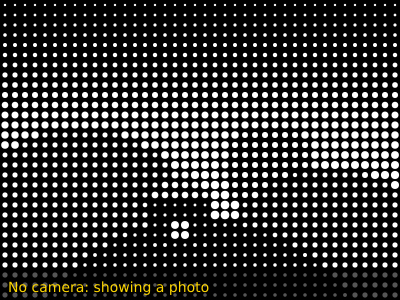
You, drawn as a grid of white dots on black. Bright parts of you get big dots and dark parts get small ones. Move around and the dots follow. With no camera, it draws the same dots from a photo, so it always works.
In the guide: Paths, clipping and pictures › The camera
How it works
- camera.open() makes a camera object, and cam.start(400, 300) opens it. The computer asks your permission first. It opens only here, and the light goes off when the sketch ends.
- cam.picture() is a still copy of the latest frame. It is an ordinary picture, so picture.get(x, y) gives the colour at one point.
- Looking at a grid of points, one every 10 pixels, is quick. Looking at every pixel of every frame would not be.
- The size of each dot comes from the brightness: red, green and blue added up, divided by 765 (3 x 255).
- cam.is_ready() is False until the first frame arrives, and for ever if there is no camera. Then the sketch loads a photo with f.load_image() and draws that instead.
Make it yours
- Change STEP to 6 for more, smaller dots, or to 16 for fewer and bigger ones.
- Change the background and the dot colour. Try dark dots on a white background.
- Draw squares with f.square() or letters with f.text() in place of circles.
- Show the colour of the dot: use f.fill(c) in place of the white.
- Call cam.start(400, 300, mirror=False) to see what the camera sees, not a mirror.
The code
Copy it into a file and run it.
"""A mirror of dots

You, drawn as a grid of white dots on black. Bright parts of you get big dots and dark parts get small ones.
Move around and the dots follow. With no camera, it draws the same dots from a photo, so it always works.

How it works:
- camera.open() makes a camera object, and cam.start(400, 300) opens it. The computer asks your permission first.
  It opens only here, and the light goes off when the sketch ends.
- cam.picture() is a still copy of the latest frame. It is an ordinary picture, so picture.get(x, y) gives the
  colour at one point.
- Looking at a grid of points, one every 10 pixels, is quick. Looking at every pixel of every frame would not be.
- The size of each dot comes from the brightness: red, green and blue added up, divided by 765 (3 x 255).
- cam.is_ready() is False until the first frame arrives, and for ever if there is no camera. Then the sketch
  loads a photo with f.load_image() and draws that instead.

Make it yours:
- Change STEP to 6 for more, smaller dots, or to 16 for fewer and bigger ones.
- Change the background and the dot colour. Try dark dots on a white background.
- Draw squares with f.square() or letters with f.text() in place of circles.
- Show the colour of the dot: use f.fill(c) in place of the white.
- Call cam.start(400, 300, mirror=False) to see what the camera sees, not a mirror.
"""
import funground as f
from funground import camera

WIDTH, HEIGHT = 400, 300
STEP = 10                                    # one dot for every 10 x 10 pixels
photo = f.load_image("data/photo.jpg")       # shown when there is no camera
cam = None


def open_camera():
    """The camera, started, or None when this computer has none or will not share it."""
    try:
        cam = camera.open()
        cam.start(WIDTH, HEIGHT)
        return cam
    except RuntimeError:
        return None


def setup():
    global cam
    f.size(WIDTH, HEIGHT)
    f.no_stroke()
    cam = open_camera()


def draw():
    live = cam is not None and cam.is_ready()
    source = cam.picture() if live else photo
    f.background("black")
    f.fill("white")
    for y in range(STEP // 2, HEIGHT, STEP):
        for x in range(STEP // 2, WIDTH, STEP):
            c = source.get(x, y)
            brightness = (c.red + c.green + c.blue) / 765
            f.circle(x, y, STEP * brightness)
    if not live:
        f.fill(0, 0, 0, 170)
        f.rect(0, HEIGHT - 28, WIDTH, 28)
        f.fill("gold")
        f.text_size(14)
        f.text("No camera: showing a photo", 8, HEIGHT - 21)


f.run()