Teach by example
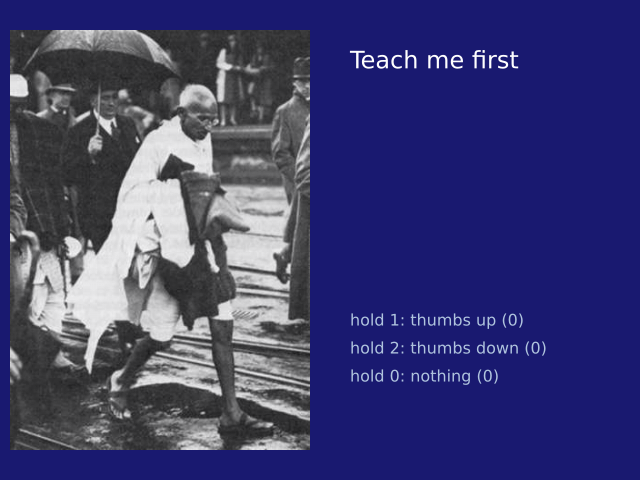
Teach the computer three things with your camera, then let it guess. Hold up a thumb inside the gold box and hold down the 1 key: each moment you hold the key, what is in the box is kept as one example of "thumbs up". Do the same with 2 for "thumbs down" and 0 for "nothing" (the box with no hand in it). Then put a hand in the box and watch the guess on the right. With no camera it shows two photos in turn, and the keys teach the photo on the screen. It needs the models library, which is a separate install: funground-ml.
In the guide: Models: bodies, hands, words and sounds › Teach a model
How it works
- The model looks at the whole picture it is given. A whole camera picture is mostly you and the room, so the sketch cuts out a box from the middle (focus, a picture drawn again every frame) and teaches and guesses only that. Then the thing you hold up fills most of what the model sees, and the room behind matters less.
- ml.teach(name, focus) keeps what is in the box as one example of name, and gives back how many examples that name has now. Holding a key teaches as fast as the computer can, one picture at a time, so draw() never waits.
- ml.guess(focus, k=3) names the taught thing the box is most like. guess.name is the best guess, guess.score says how sure it is (0.5 is a guess between two, 0.95 is fairly sure), and guess.next holds the next two names.
- The computer always picks the nearest thing it was taught. That is why "nothing" is taught too: without it, an empty box would still be called "thumbs up" or "thumbs down".
- Teach at least 5 pictures of each name, and move a little while you teach: nearer, further, to the side. Different pictures teach it more than the same picture many times.
- What you taught lasts while the sketch runs. The first teach downloads the picture model (10 MB, once) into a models folder beside the sketch, and the pictures never leave your computer.
Make it yours
- Change the names in KEYS, or add a fourth key and name.
- Make BOX bigger or smaller, or move the box to where your hand is (ml.hand(cam) can tell you).
- Teach things on your desk instead of hands: a cup, a pen, a book.
- Do something when the guess changes, such as playing a sound or changing the background colour.
- Try ml.teach(name, focus, model="dinov2") on the first teach: a bigger, slower model that sometimes tells look-alike things apart better.
The code
Copy it into a file and run it.
"""Teach by example

Teach the computer three things with your camera, then let it guess. Hold up a thumb inside the gold box and hold down the 1
key: each moment you hold the key, what is in the box is kept as one example of "thumbs up". Do the same with 2 for "thumbs
down" and 0 for "nothing" (the box with no hand in it). Then put a hand in the box and watch the guess on the right. With no
camera it shows two photos in turn, and the keys teach the photo on the screen. It needs the models library, which is a
separate install: funground-ml.

How it works:
- The model looks at the whole picture it is given. A whole camera picture is mostly you and the room, so the sketch cuts out
  a box from the middle (focus, a picture drawn again every frame) and teaches and guesses only that. Then the thing you hold
  up fills most of what the model sees, and the room behind matters less.
- ml.teach(name, focus) keeps what is in the box as one example of name, and gives back how many examples that name has now.
  Holding a key teaches as fast as the computer can, one picture at a time, so draw() never waits.
- ml.guess(focus, k=3) names the taught thing the box is most like. guess.name is the best guess, guess.score
  says how sure it is (0.5 is a guess between two, 0.95 is fairly sure), and guess.next holds the next two names.
- The computer always picks the nearest thing it was taught. That is why "nothing" is taught too: without it, an empty box
  would still be called "thumbs up" or "thumbs down".
- Teach at least 5 pictures of each name, and move a little while you teach: nearer, further, to the side. Different
  pictures teach it more than the same picture many times.
- What you taught lasts while the sketch runs. The first teach downloads the picture model (10 MB, once) into a models
  folder beside the sketch, and the pictures never leave your computer.

Make it yours:
- Change the names in KEYS, or add a fourth key and name.
- Make BOX bigger or smaller, or move the box to where your hand is (ml.hand(cam) can tell you).
- Teach things on your desk instead of hands: a cup, a pen, a book.
- Do something when the guess changes, such as playing a sound or changing the background colour.
- Try ml.teach(name, focus, model="dinov2") on the first teach: a bigger, slower model that sometimes tells look-alike things
  apart better.
"""
import funground as f
from funground import camera, ml

KEYS = {"1": "thumbs up", "2": "thumbs down", "0": "nothing"}
BAR_WIDTH = 260
BOX = 160                                                    # the focus box: the part of the camera that is taught and guessed
counts = {name: 0 for name in KEYS.values()}
photos = [f.load_image("data/gandhi_london_rain.jpg"), f.load_image("data/standing_woman_640.jpg")]   # when there is no camera
for photo in photos:
    photo.resize(300, 420)
cam = None
focus = None


def setup():
    global cam, focus
    f.size(640, 480)
    focus = f.create_graphics(BOX, BOX)
    try:
        cam = camera.open()
        cam.start(320, 240)
    except RuntimeError:
        cam = None


def draw():
    f.background("midnightblue")
    if cam is not None and cam.is_ready():
        left, top = (cam.width - BOX) // 2, (cam.height - BOX) // 2
        focus.image(cam, -left, -top)                         # copy the middle of the camera into the box
        source = focus
        f.image(cam, 10, 10)
        f.no_fill()
        f.stroke("gold")
        f.stroke_width(3)
        f.rect(10 + left, 10 + top, BOX, BOX)
    else:
        source = photos[f.frame_count // 90 % len(photos)]
        f.image(source, 10, 30)
    for key, name in KEYS.items():
        if f.key_down(key):
            counts[name] = ml.teach(name, source)
    show_guess(ml.guess(source, k=3))
    show_keys()


def show_guess(guess):
    f.no_stroke()
    f.text_align("left", "center")
    f.fill("white")
    if guess is None:
        f.text_size(24)
        f.text("Teach me first", 350, 60)
        return
    f.text_size(40)
    f.text(guess.name, 350, 60)
    for i, each in enumerate([guess] + list(guess.next)):
        y = 130 + i * 50
        f.text_size(18)
        f.fill("gold" if i == 0 else "lightsteelblue")
        f.text(each.name, 350, y - 20)
        f.fill("darkslateblue")
        f.rect(350, y - 6, BAR_WIDTH, 16)
        f.fill("gold" if i == 0 else "lightsteelblue")
        f.rect(350, y - 6, BAR_WIDTH * each.score, 16)


def show_keys():
    f.text_size(16)
    f.fill("lightsteelblue")
    for i, (key, name) in enumerate(KEYS.items()):
        f.text(f"hold {key}: {name} ({counts[name]})", 350, 320 + i * 28)


f.run(fps=30)