A headline that fills its width
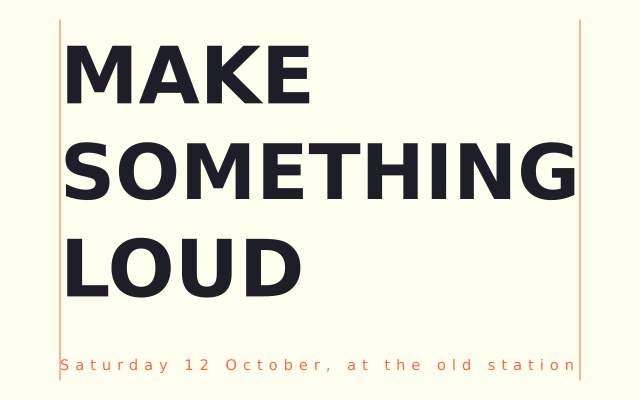
Each word of this poster fills the column, as big as its band of the page allows. f.fit_text_size() works out the size that makes a text a given width, with the font, style and tracking you have set, and keeps it within a height if you give one.
In the guide: Text › A headline that fills its width
How it works
- f.fit_text_size(word, width) returns a text size. Setting f.text_size() to it makes the word that wide.
- Long words are limited by the width, so SOMETHING spans the column.
- Short words would grow taller than the page, so each word also gets a height: its share of the page, BAND. f.fit_text_size(word, width, BAND) picks the largest size that respects both.
- The size depends on the font and style: the words are bold, the tagline uses a wide tracking.
- The thin lines show the column's edges.
Make it yours
- Change the words in WORDS, or add more.
- Change MARGIN to make the column narrower or wider, or BAND to give the words more height.
- Try f.text_style("italic") or a font of your own with f.load_font() before fitting.
- Change f.text_tracking(6) on the last line and see the size change to keep the width.
The code
Copy it into a file and run it.
"""A headline that fills its width

Each word of this poster fills the column, as big as its band of the page allows. f.fit_text_size()
works out the size that makes a text a given width, with the font, style and tracking you have set,
and keeps it within a height if you give one.

How it works:
- f.fit_text_size(word, width) returns a text size. Setting f.text_size() to it makes the word that
  wide.
- Long words are limited by the width, so SOMETHING spans the column.
- Short words would grow taller than the page, so each word also gets a height: its share of the
  page, BAND. f.fit_text_size(word, width, BAND) picks the largest size that respects both.
- The size depends on the font and style: the words are bold, the tagline uses a wide tracking.
- The thin lines show the column's edges.

Make it yours:
- Change the words in WORDS, or add more.
- Change MARGIN to make the column narrower or wider, or BAND to give the words more height.
- Try f.text_style("italic") or a font of your own with f.load_font() before fitting.
- Change f.text_tracking(6) on the last line and see the size change to keep the width.
"""
import funground as f

WORDS = ["MAKE", "SOMETHING", "LOUD"]
MARGIN = 60
BAND = 92                    # the height each word may take
TAGLINE = "Saturday 12 October, at the old station"


def setup():
    f.size(640, 400)


def draw():
    f.background("ivory")
    width = f.width - 2 * MARGIN

    f.stroke("tomato")
    f.stroke_width(1)
    f.line(MARGIN, 20, MARGIN, f.height - 20)
    f.line(MARGIN + width, 20, MARGIN + width, f.height - 20)
    f.no_stroke()

    f.fill(30, 30, 40)
    f.text_style("bold")
    f.text_align("left", "baseline")
    y = 30
    for word in WORDS:
        f.text_size(f.fit_text_size(word, width, BAND))
        y += f.text_ascent()
        f.text(word, MARGIN, y)
        y += f.text_descent() + 6

    f.text_style("normal")
    f.text_tracking(6)
    f.fill("tomato")
    f.text_size(f.fit_text_size(TAGLINE, width, height=24))
    f.text(TAGLINE, MARGIN, f.height - 30)
    f.text_tracking(0)


f.run()