Where things are: a map of the canvas
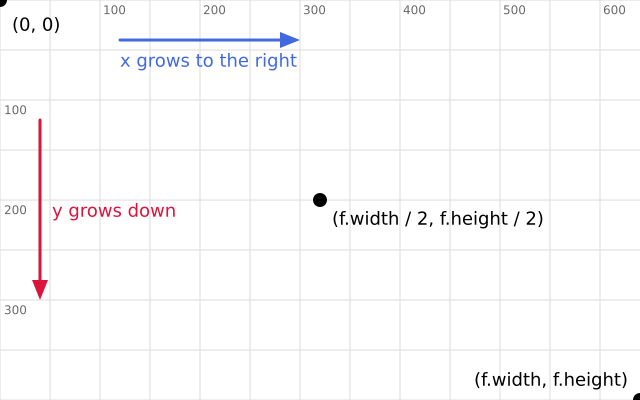
What you see: a map of the drawing area, 640 pixels wide and 400 high. A light grid has a line every 50 pixels. The numbers along the top and left edges count pixels. Marks and labels show the origin, the centre and the bottom-right corner.
In the guide: Getting started › Where things are
How it works
- f.size() sets the width and the height. f.width and f.height give the two numbers back.
- The point (0, 0), called the origin, is the top-left corner. x grows to the right. y grows down, which is the other way round from a graph in maths class.
- The centre is (f.width / 2, f.height / 2). The bottom-right corner is (f.width, f.height).
- f.line() draws the grid with a loop. f.text() writes the numbers and labels.
- f.circle() marks the points. f.triangle() makes the arrow heads.
- f.text_align() says which point of the text the position means. Here it keeps the corner label inside the window.
Make it yours
- Change 50 in the two grid loops to 25 or 100 and watch the grid change.
- Change the numbers in f.size(). The centre and the corner labels move with it.
- Mark the top-right corner with a circle. Its position is (f.width, 0).
- Draw a circle at x = 100 and y = 300. Is it where you expected?
- Change the colour of the grid with f.stroke().
The code
Copy it into a file and run it.
"""Where things are: a map of the canvas

What you see: a map of the drawing area, 640 pixels wide and 400 high. A light grid has a line
every 50 pixels. The numbers along the top and left edges count pixels. Marks and labels show the
origin, the centre and the bottom-right corner.

How it works:
- f.size() sets the width and the height. f.width and f.height give the two numbers back.
- The point (0, 0), called the origin, is the top-left corner. x grows to the right. y grows
  down, which is the other way round from a graph in maths class.
- The centre is (f.width / 2, f.height / 2). The bottom-right corner is (f.width, f.height).
- f.line() draws the grid with a loop. f.text() writes the numbers and labels.
- f.circle() marks the points. f.triangle() makes the arrow heads.
- f.text_align() says which point of the text the position means. Here it keeps the corner
  label inside the window.

Make it yours:
- Change 50 in the two grid loops to 25 or 100 and watch the grid change.
- Change the numbers in f.size(). The centre and the corner labels move with it.
- Mark the top-right corner with a circle. Its position is (f.width, 0).
- Draw a circle at x = 100 and y = 300. Is it where you expected?
- Change the colour of the grid with f.stroke().
"""
import funground as f

f.size(640, 400, title="where things are")
f.background("white")

# a light grid, one line every 50 pixels
f.stroke("gainsboro")
f.stroke_width(1)
for x in range(0, f.width + 1, 50):
    f.line(x, 0, x, f.height)
for y in range(0, f.height + 1, 50):
    f.line(0, y, f.width, y)

# numbers along the top edge (x) and the left edge (y), every 100 pixels
f.no_stroke()
f.fill("dimgray")
f.text_size(12)
for x in range(100, f.width, 100):
    f.text(x, x + 3, 3)
for y in range(100, f.height, 100):
    f.text(y, 4, y + 3)

# an arrow along the top: x grows to the right
f.stroke("royalblue")
f.stroke_width(3)
f.line(120, 40, 280, 40)
f.no_stroke()
f.fill("royalblue")
f.triangle(300, 40, 280, 32, 280, 48)
f.text_size(18)
f.text("x grows to the right", 120, 50)

# an arrow down the left side: y grows down
f.stroke("crimson")
f.stroke_width(3)
f.line(40, 120, 40, 280)
f.no_stroke()
f.fill("crimson")
f.triangle(40, 300, 32, 280, 48, 280)
f.text("y grows down", 52, 200)

# the origin
f.fill("black")
f.circle(0, 0, 14)
f.text("(0, 0)", 12, 14)

# the centre
f.circle(f.width / 2, f.height / 2, 14)
f.text("(f.width / 2, f.height / 2)", f.width / 2 + 12, f.height / 2 + 8)

# the bottom-right corner: align the text to its bottom right so it stays inside
f.circle(f.width, f.height, 14)
f.text_align("right", "bottom")
f.text("(f.width, f.height)", f.width - 12, f.height - 10)

f.show()