A print poster in CMYK
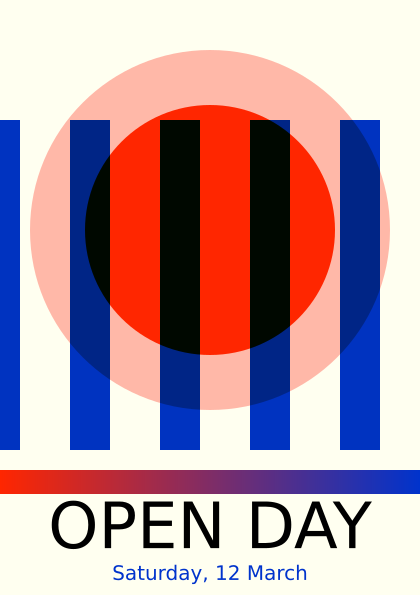
A two-ink poster for a printer. Every colour comes from f.cmyk(), so the PDF it saves holds exactly the ink amounts written here: no red, green or blue. The picture on the screen is an approximation.
How it works
- f.cmyk(cyan, magenta, yellow, black) makes a colour from four inks, each from 0 to 100 percent. f.cmyk(0, 85, 100, 0) is a warm red: no cyan, a lot of magenta and yellow, no black.
- The poster uses two inks and paper. The red ink is f.cmyk(0, 85, 100, 0). The blue ink is f.cmyk(100, 75, 0, 20). The paper is f.cmyk(0, 0, 6, 0), a little yellow. A lighter amount of an ink is a tint: f.cmyk(0, 28, 34, 0) is the red ink at about a third, and it makes the big circle.
- f.blend_mode("multiply") lets the blue stripes darken the red ink where they cross it, as two layers of ink do on paper.
- The band at the bottom is a gradient between the two inks. A gradient takes cmyk colours as stops, and the PDF keeps it as a CMYK gradient.
- The headline is black ink, f.cmyk(0, 0, 0, 100), the one that text should be in print.
- f.save("cmyk_poster.pdf", bleed=f.mm(3), marks=True) adds a 3 mm bleed and crop marks. The marks are in registration colour, all four inks at 100 percent. The save is inside if f.frame_count == 0, so it happens once.
Make it yours
- Change the red ink to f.cmyk(0, 60, 100, 0) for an orange.
- Change the numbers in the tint, f.cmyk(0, 28, 34, 0), to make the circle paler or stronger.
- Take out f.blend_mode("multiply") and see the stripes cover the circle instead.
- Change the words "OPEN DAY" and "Saturday, 12 March".
- Add a third ink, such as f.cmyk(100, 0, 100, 0), for a green leaf shape.
The code
Copy it into a file and run it.
"""A print poster in CMYK

A two-ink poster for a printer. Every colour comes from f.cmyk(), so the PDF it saves holds exactly
the ink amounts written here: no red, green or blue. The picture on the screen is an approximation.

How it works:
- f.cmyk(cyan, magenta, yellow, black) makes a colour from four inks, each from 0 to 100 percent.
  f.cmyk(0, 85, 100, 0) is a warm red: no cyan, a lot of magenta and yellow, no black.
- The poster uses two inks and paper. The red ink is f.cmyk(0, 85, 100, 0). The blue ink is
  f.cmyk(100, 75, 0, 20). The paper is f.cmyk(0, 0, 6, 0), a little yellow. A lighter amount of an
  ink is a tint: f.cmyk(0, 28, 34, 0) is the red ink at about a third, and it makes the big circle.
- f.blend_mode("multiply") lets the blue stripes darken the red ink where they cross it, as two
  layers of ink do on paper.
- The band at the bottom is a gradient between the two inks. A gradient takes cmyk colours as
  stops, and the PDF keeps it as a CMYK gradient.
- The headline is black ink, f.cmyk(0, 0, 0, 100), the one that text should be in print.
- f.save("cmyk_poster.pdf", bleed=f.mm(3), marks=True) adds a 3 mm bleed and crop marks. The marks
  are in registration colour, all four inks at 100 percent. The save is inside if f.frame_count == 0,
  so it happens once.

Make it yours:
- Change the red ink to f.cmyk(0, 60, 100, 0) for an orange.
- Change the numbers in the tint, f.cmyk(0, 28, 34, 0), to make the circle paler or stronger.
- Take out f.blend_mode("multiply") and see the stripes cover the circle instead.
- Change the words "OPEN DAY" and "Saturday, 12 March".
- Add a third ink, such as f.cmyk(100, 0, 100, 0), for a green leaf shape.
"""
import funground as f

RED = f.cmyk(0, 85, 100, 0)
BLUE = f.cmyk(100, 75, 0, 20)
BLACK = f.cmyk(0, 0, 0, 100)
PAPER = f.cmyk(0, 0, 6, 0)


def setup():
    f.size(420, 595)


def draw():
    f.background(PAPER)
    f.no_stroke()

    f.fill(f.cmyk(0, 28, 34, 0))                 # the red ink at about a third: a tint
    f.circle(210, 230, 360)
    f.fill(RED)
    f.circle(210, 230, 250)

    f.blend_mode("multiply")                       # the blue ink darkens the red where they cross
    f.fill(BLUE)
    for i in range(5):
        f.rect(-20 + i * 90, 120, 40, 330)
    f.blend_mode("normal")

    f.fill(f.linear_gradient(0, 0, 420, 0, [RED, BLUE]))
    f.rect(0, 470, 420, 24)

    f.text_align("center", "center")
    f.fill(BLACK)
    f.text_size(64)
    f.text("OPEN DAY", 210, 526)
    f.fill(BLUE)
    f.text_size(20)
    f.text("Saturday, 12 March", 210, 573)

    if f.frame_count == 0:                         # save the first frame once
        f.save("cmyk_poster.pdf", bleed=f.mm(3), marks=True)


f.run()