Colour schemes: random shapes from your own colours
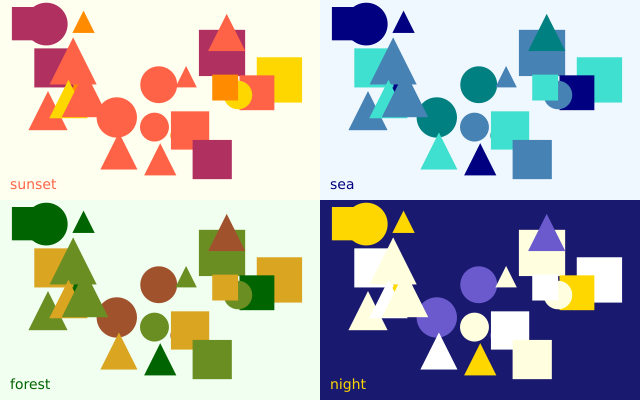
The same random shapes are drawn four times, each time with a different colour scheme. A scheme is a paper colour and a short list of ink colours that you choose. Random picks from your own list keep the surprise of randomness, but the picture still looks planned.
In the guide: Colour › Colour names from a list
How it works
- SCHEMES holds four schemes. Each has a name, a paper colour and a list of inks.
- f.random_choice(inks) picks one ink from the list for each shape. A colour that is in the list twice is picked twice as often: "sunset" lists "tomato" three times, so it is the main colour and the others are accents.
- dot, box and peak each draw a shape centred on x, y with the same three numbers. That is why f.random_choice([dot, box, peak]) can pick any of them: the list holds the functions themselves.
- setup() chooses the 24 shapes once, with their places and sizes, and keeps them in the list shapes. Every panel draws that same list, so only the colours change.
- f.random_seed(5) in panel() makes the colour picks the same on every frame, so nothing flickers.
- f.translate() moves each panel to its corner, so the shapes are drawn as if each panel were a small canvas of its own.
Make it yours
- Make a scheme of your own: copy a line in SCHEMES and change the name and the colours.
- Put one ink in a list several times to make it the main colour.
- Use f.COLORS in a list, such as [f.COLORS.NAVY, f.COLORS.GOLD], so your editor lists the names.
- Change the seed 1 in setup() for a different layout, or range(24) for more shapes.
- Draw a stroke in the paper colour around each shape with f.stroke(paper) and f.stroke_width(3).
The code
Copy it into a file and run it.
"""Colour schemes: random shapes from your own colours

The same random shapes are drawn four times, each time with a different colour scheme. A scheme is a
paper colour and a short list of ink colours that you choose. Random picks from your own list keep
the surprise of randomness, but the picture still looks planned.

How it works:
- SCHEMES holds four schemes. Each has a name, a paper colour and a list of inks.
- f.random_choice(inks) picks one ink from the list for each shape. A colour that is in the list
  twice is picked twice as often: "sunset" lists "tomato" three times, so it is the main colour and
  the others are accents.
- dot, box and peak each draw a shape centred on x, y with the same three numbers. That is why
  f.random_choice([dot, box, peak]) can pick any of them: the list holds the functions themselves.
- setup() chooses the 24 shapes once, with their places and sizes, and keeps them in the list
  shapes. Every panel draws that same list, so only the colours change.
- f.random_seed(5) in panel() makes the colour picks the same on every frame, so nothing flickers.
- f.translate() moves each panel to its corner, so the shapes are drawn as if each panel were a
  small canvas of its own.

Make it yours:
- Make a scheme of your own: copy a line in SCHEMES and change the name and the colours.
- Put one ink in a list several times to make it the main colour.
- Use f.COLORS in a list, such as [f.COLORS.NAVY, f.COLORS.GOLD], so your editor lists the names.
- Change the seed 1 in setup() for a different layout, or range(24) for more shapes.
- Draw a stroke in the paper colour around each shape with f.stroke(paper) and f.stroke_width(3).
"""
import funground as f

SCHEMES = [
    ("sunset", "ivory", ["tomato", "tomato", "tomato", "gold", "darkorange", "maroon"]),
    ("sea", "aliceblue", ["navy", "steelblue", "teal", "turquoise"]),
    ("forest", "honeydew", ["darkgreen", "olivedrab", "sienna", "goldenrod"]),
    ("night", "midnightblue", ["gold", "lightyellow", "slateblue", "white"]),
]
PANEL_W, PANEL_H = 320, 200


def dot(x, y, size):
    f.circle(x, y, size)


def box(x, y, size):
    f.square(x - size / 2, y - size / 2, size)


def peak(x, y, size):
    half = size / 2
    f.triangle(x - half, y + half, x, y - half, x + half, y + half)


def panel(name, paper, inks):
    f.no_stroke()
    f.fill(paper)
    f.rect(0, 0, PANEL_W, PANEL_H)
    f.random_seed(5)                                   # the same colour picks on every frame
    for shape, x, y, size in shapes:
        f.fill(f.random_choice(inks))
        shape(x, y, size)
    f.fill(inks[0])
    f.text_size(14)
    f.text(name, 10, PANEL_H - 24)


def setup():
    global shapes
    f.size(640, 400)
    f.random_seed(1)
    shapes = []                                        # chosen once: every panel draws the same shapes
    for _ in range(24):
        shape = f.random_choice([dot, box, peak])      # the function itself, not called yet
        shapes.append((shape, f.random(20, PANEL_W - 20), f.random(20, PANEL_H - 36), f.random(16, 48)))


def draw():
    for i, (name, paper, inks) in enumerate(SCHEMES):
        with f.saved_state():
            f.translate((i % 2) * PANEL_W, (i // 2) * PANEL_H)
            panel(name, paper, inks)


f.run()