A stick figure on a photograph
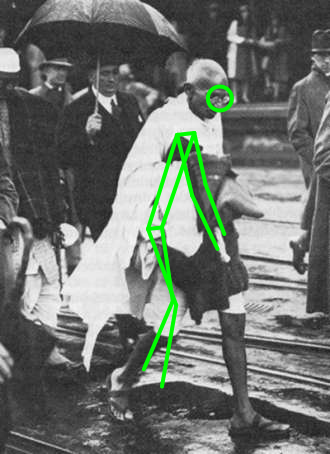
A photograph of Mahatma Gandhi arriving in England in 1931, and a green stick figure drawn over him. The computer finds his body, and the sketch joins the points it found. It needs the models library, which is a separate install: funground-ml.
In the guide: Models: bodies, hands, words and sounds › Find a body
How it works
- ml.pose(photo) looks for a body in a picture. It gives a body with 33 named points, or None if no one is there.
- Each point is a Vector in the photo's own pixels, so body.left_shoulder.x and .y can go straight into f.line().
- BONES is a list of pairs of names. The loop looks each name up in body.points and draws a line between the two points.
- The nose gets a circle. The first run downloads the pose model (once) into a models folder beside the sketch.
- The photograph is drawn first with f.image(), so the figure lands on top of it.
Make it yours
- Add the ears and the mouth: body.left_ear, body.right_ear, body.mouth_left and body.mouth_right.
- Change f.stroke("lime") and f.stroke_width(4) to give the figure a new look.
- Draw a small circle at every point in body.points.values() instead of lines.
- Try your own photo: put it in the data folder and change the name in f.load_image().
The code
Copy it into a file and run it.
"""A stick figure on a photograph

A photograph of Mahatma Gandhi arriving in England in 1931, and a green stick figure drawn over him. The computer
finds his body, and the sketch joins the points it found. It needs the models library, which is a separate install: funground-ml.

How it works:
- ml.pose(photo) looks for a body in a picture. It gives a body with 33 named points, or None if no one is there.
- Each point is a Vector in the photo's own pixels, so body.left_shoulder.x and .y can go straight into f.line().
- BONES is a list of pairs of names. The loop looks each name up in body.points and draws a line between the two points.
- The nose gets a circle. The first run downloads the pose model (once) into a models folder beside the sketch.
- The photograph is drawn first with f.image(), so the figure lands on top of it.

Make it yours:
- Add the ears and the mouth: body.left_ear, body.right_ear, body.mouth_left and body.mouth_right.
- Change f.stroke("lime") and f.stroke_width(4) to give the figure a new look.
- Draw a small circle at every point in body.points.values() instead of lines.
- Try your own photo: put it in the data folder and change the name in f.load_image().
"""
import funground as f
from funground import ml

photo = f.load_image("data/gandhi_london_rain.jpg")
BONES = [("left_shoulder", "right_shoulder"), ("left_shoulder", "left_elbow"), ("left_elbow", "left_wrist"),
         ("right_shoulder", "right_elbow"), ("right_elbow", "right_wrist"), ("left_shoulder", "left_hip"),
         ("right_shoulder", "right_hip"), ("left_hip", "right_hip"), ("left_hip", "left_knee"),
         ("left_knee", "left_ankle"), ("right_hip", "right_knee"), ("right_knee", "right_ankle")]


def setup():
    f.size(photo.width, photo.height)


def draw():
    f.image(photo, 0, 0)
    body = ml.pose(photo)
    if body:
        f.stroke("lime")
        f.stroke_width(4)
        f.stroke_cap("round")
        f.no_fill()
        for first, second in BONES:
            a, b = body.points[first], body.points[second]
            f.line(a.x, a.y, b.x, b.y)
        f.circle(body.nose.x, body.nose.y, 24)


f.run()