Follow your finger
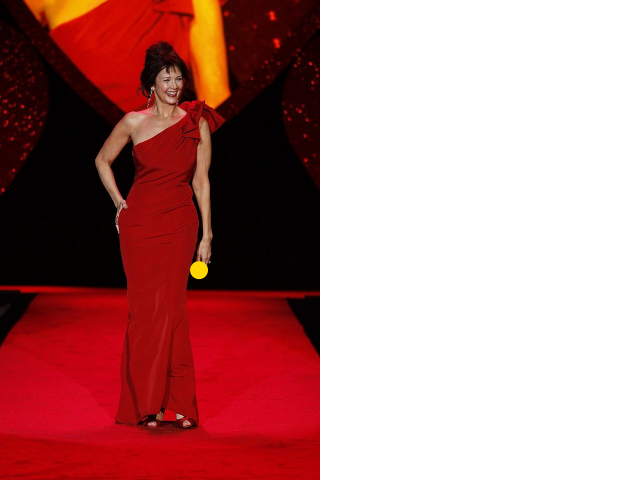
Hold up a hand to your camera. A golden trail follows the tip of your index finger, and it fades as the finger moves on. With no camera, it uses a photo, so it still works. It needs the models library, which is a separate install: funground-ml. (This one uses real time, so the picture changes from run to run.)
In the guide: Models: bodies, hands, words and sounds › Find a hand
How it works
- ml.hand(cam) looks for a hand in the camera's latest frame. It gives a hand with 21 named points, or None.
- hand.index_finger_tip is a Vector. The sketch keeps the last TRAIL of them in a list, newest last.
- Each line of the trail is more solid than the one before it, so the oldest part fades away.
- When the hand goes away, the trail shrinks one point at a time until it is gone.
- The camera is mirrored by default, so the trail moves the way your finger seems to move on the screen.
Make it yours
- Change TRAIL to 15 for a short tail, or to 120 for a long ribbon.
- Follow another point, such as hand.thumb_tip or hand.wrist.
- Draw a trail for the thumb as well, in another colour.
- Use f.stroke_width() to make the line thicker near the fingertip.
The code
Copy it into a file and run it.
"""Follow your finger

Hold up a hand to your camera. A golden trail follows the tip of your index finger, and it fades as the finger moves on.
With no camera, it uses a photo, so it still works. It needs the models library, which is a separate install: funground-ml.

How it works:
- ml.hand(cam) looks for a hand in the camera's latest frame. It gives a hand with 21 named points, or None.
- hand.index_finger_tip is a Vector. The sketch keeps the last TRAIL of them in a list, newest last.
- Each line of the trail is more solid than the one before it, so the oldest part fades away.
- When the hand goes away, the trail shrinks one point at a time until it is gone.
- The camera is mirrored by default, so the trail moves the way your finger seems to move on the screen.

Make it yours:
- Change TRAIL to 15 for a short tail, or to 120 for a long ribbon.
- Follow another point, such as hand.thumb_tip or hand.wrist.
- Draw a trail for the thumb as well, in another colour.
- Use f.stroke_width() to make the line thicker near the fingertip.
"""
# gallery: time-dependent
import funground as f
from funground import camera, ml

TRAIL = 40
still = f.load_image("data/standing_woman_640.jpg")      # used when there is no camera
still.resize(320, 480)
cam = None
trail = []


def setup():
    global cam
    f.size(640, 480)
    try:
        cam = camera.open()
        cam.start(640, 480)
    except RuntimeError:
        cam = None


def draw():
    source = cam if cam is not None and cam.is_ready() else still
    f.background("white")
    f.image(source, 0, 0)
    hand = ml.hand(source)
    if hand:
        trail.append(hand.index_finger_tip)
        del trail[:-TRAIL]
    elif trail:
        trail.pop(0)
    f.stroke_width(8)
    f.stroke_cap("round")
    for i in range(1, len(trail)):
        f.stroke(255, 200, 0, 255 * i // len(trail))
        f.line(trail[i - 1].x, trail[i - 1].y, trail[i].x, trail[i].y)
    if trail:
        f.no_stroke()
        f.fill("gold")
        f.circle(trail[-1].x, trail[-1].y, 18)


f.run(fps=24)