In front of the sea
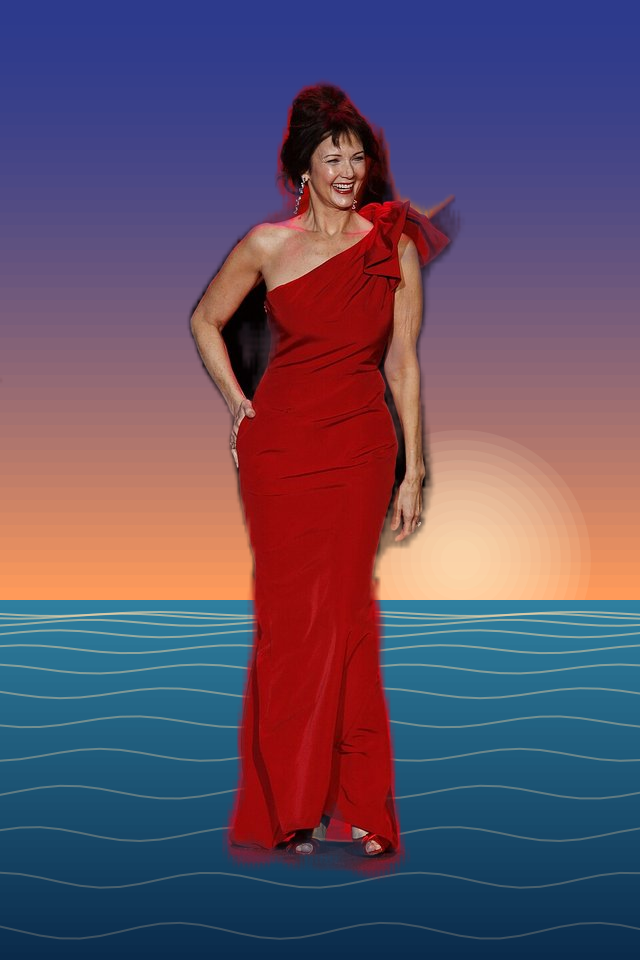
A woman on a catwalk is cut out of her photograph and put in front of a sunset sea that the sketch draws itself. The computer finds the person, and everything else in the photograph becomes see-through. It needs the models library, which is a separate install: funground-ml.
In the guide: Models: bodies, hands, words and sounds › Cut out the person
How it works
- ml.person(photo) gives a new picture the size of the photo. Only the person is left in it. The rest is see-through.
- The edge is soft. A pixel on the edge is a little see-through, so the cut-out blends into what is behind it.
- The sky is a stack of thin bands. Each band is a step of f.lerp_color() between two colours. The sea is built the same way.
- Wavy lines are drawn on the sea with f.begin_shape(), f.vertex() and a sine wave.
- The background is drawn first. f.image() draws the person last, so she stands in front.
- With a camera, ml.person(cam) works the same way. Use f.image(ml.person(cam), 0, 0) to put yourself in front of the sea.
Make it yours
- Change the four colours at the top for a morning, or a night.
- Move HORIZON to put the sea higher or lower behind her.
- Add stars to the sky with f.circle() and f.random_seed().
- Draw the person twice: first with f.opacity(80) and a shift in x, then normally, for a shadow.
The code
Copy it into a file and run it.
"""In front of the sea

A woman on a catwalk is cut out of her photograph and put in front of a sunset sea that the sketch draws itself. The computer
finds the person, and everything else in the photograph becomes see-through. It needs the models library, which is a separate
install: funground-ml.

How it works:
- ml.person(photo) gives a new picture the size of the photo. Only the person is left in it. The rest is see-through.
- The edge is soft. A pixel on the edge is a little see-through, so the cut-out blends into what is behind it.
- The sky is a stack of thin bands. Each band is a step of f.lerp_color() between two colours. The sea is built the same way.
- Wavy lines are drawn on the sea with f.begin_shape(), f.vertex() and a sine wave.
- The background is drawn first. f.image() draws the person last, so she stands in front.
- With a camera, ml.person(cam) works the same way. Use f.image(ml.person(cam), 0, 0) to put yourself in front of the sea.

Make it yours:
- Change the four colours at the top for a morning, or a night.
- Move HORIZON to put the sea higher or lower behind her.
- Add stars to the sky with f.circle() and f.random_seed().
- Draw the person twice: first with f.opacity(80) and a shift in x, then normally, for a shadow.
"""
import math

import funground as f
from funground import ml

photo = f.load_image("data/standing_woman_640.jpg")
HORIZON = 600
TOP, LOW_SKY = "#2d3a8c", "#ff9a5a"          # the sky: high up, and at the horizon
NEAR, FAR = "#0a2a4a", "#2f7f9f"             # the sea: close to us, and at the horizon
BANDS = 48                                    # how many thin bands each of them is made of


def sky():
    height = HORIZON / BANDS
    for i in range(BANDS):
        f.fill(f.lerp_color(TOP, LOW_SKY, (i / (BANDS - 1)) ** 1.6))
        f.rect(0, i * height, photo.width, height + 1)


def sun():
    for i in range(12):
        f.fill(255, 240, 200, 26)
        f.circle(photo.width * 0.72, HORIZON - 40, 260 - i * 20)


def sea():
    depth = photo.height - HORIZON
    height = depth / BANDS
    for i in range(BANDS):
        f.fill(f.lerp_color(FAR, NEAR, i / (BANDS - 1)))
        f.rect(0, HORIZON + i * height, photo.width, height + 1)
    f.no_fill()
    f.stroke_width(2)
    for row in range(14):
        y = HORIZON + 14 + row * row * 2.2
        f.stroke(255, 220, 170, 150 - row * 8)
        f.begin_shape()
        for x in range(0, photo.width + 20, 20):
            f.vertex(x, y + math.sin(x * 0.03 + row) * (2 + row * 0.5))
        f.end_shape()
    f.no_stroke()


def setup():
    f.size(photo.width, photo.height)


def draw():
    f.no_stroke()
    sky()
    sun()
    sea()
    cutout = ml.person(photo)
    if cutout is not None:
        f.image(cutout, 0, 0)


f.run()